Mar 5, 2026

What Is an AI Data Assistant and Why You Need One

You've got a goldmine of data in Shopify, Postgres, and HubSpot. But when you need a simple number, it feels like pulling teeth. Waiting weeks for a data analyst to build a dashboard is a relic of the past. The insights are right there, locked behind a complex BI tool or a backlogged data team. This gap between urgent questions and accessible answers is a huge bottleneck. It's time to fix it.

TL;DR: Key Takeaways

  • Waiting is a competitive disadvantage. The old model of filing a ticket and waiting for a report slows your business down.

  • The problem is access, not data. You have plenty of data; the tools to analyze it were built for specialists, not for busy leaders who need answers now.

  • Conversational AI is the solution. An AI data assistant lets you skip the SQL and complex BI tools. Just ask a question in plain English and get an answer. Statspresso is your Conversational AI Data Analyst.

Your Data Is Full of Answers You Can’t Access

Man in suit at table observing floating documents and locked boxes with colorful data splashes.

Let's be blunt. The old way of getting data insights is broken for modern teams. You have a critical business question, you file a ticket, and you wait. By the time a report lands in your inbox, the moment has passed. This delay isn't just an inconvenience—it’s a real competitive disadvantage. While you’re stuck in a queue, your competition is already making data-backed decisions.

The Access and Speed Problem

The core issue isn't that you lack data. You're swimming in it. The real problem is a lack of access. Your data is siloed, and the tools built to make sense of it were designed for specialists, not for busy founders, marketers, or product managers who need answers now. Nobody has time to learn SQL on the fly or get lost in a maze of dashboard filters just to answer one question.

This forces you into a terrible choice:

  • Wrestle with the software: Waste hours trying to bend a complex BI tool to your will.

  • Wait on the experts: Add your request to the data team's ever-growing backlog.

  • Go with your gut: Make a crucial decision based on instinct because the hard data is out of reach.

None of these are good options. You need to get straight to the answer without the friction. This is exactly where a Conversational AI Data Analyst like Statspresso changes the game. It’s built on one simple promise: Skip the SQL. Just ask your data a question and get a chart in seconds. This isn't about replacing analysts; it's about empowering your entire team to find their own answers, instantly.

Meet Your New Conversational AI Data Analyst

What if you could hire a top-tier data analyst who was available 24/7, understood plain English, and turned your questions into charts in seconds? That, in a nutshell, is an AI data assistant. It's not just another generic chatbot; it's a specialized AI built to become a genuine member of your team.

Think of it as a tool that securely hooks into your business data—your Shopify sales, your Postgres user tables, your HubSpot leads—and acts as a Conversational AI Data Analyst. It's a huge shift from the rigid, pre-built dashboards of the past toward a more fluid, intuitive way of working. This approach is called Conversational Analytics or GenBI. It’s founded on a simple idea: you shouldn’t need a data science degree just to get answers about your own business.

From Static Reports to Dynamic Conversations

For years, business intelligence meant staring at static dashboards. They’re fine for tracking KPIs you already know are important, but they hit a wall the second you have a new, spontaneous question. An AI data assistant flips that script. Instead of passively looking at data, you can have a back-and-forth conversation with it.

Try asking Statspresso: "Show me my revenue by month for the last year as a bar chart."

This empowers everyone—from the founder in a board meeting to a product manager planning a sprint—to make sharp, data-backed decisions on the spot. This is why the market is exploding. Projections show the AI assistant market jumping from $3.40 billion in 2025 to $4.84 billion in 2026—a massive 42.2% annual growth rate. Experts expect the market to hit $19.63 billion by 2030. Dig deeper by reading the full report on AI assistant market growth.

How It Works Under the Hood

How does an AI assistant like Statspresso pull this off? It's a focused, three-step process combining large language models with a deep understanding of your business context.

Here’s what’s happening behind the scenes:

  • Secure Connection & Grounding: First, the assistant securely connects to your data sources. More importantly, it "grounds" itself by studying your data schema. It learns what you mean by 'active users' based on your actual tables.

  • Question to Query: When you ask, "What were our top 5 selling products last month?", the AI translates your plain English into a precise SQL query.

  • Insight to Visualization: The AI runs that query, fetches the raw numbers, and intelligently chooses the best chart to display the answer.

This is about more than just automation; it's about intelligent interpretation. A true AI data assistant doesn't just run code; it helps you figure out the right questions to ask. This is the new way of working, where you can embrace tools like an AI-assisted debugging solution that act as your conversational partner.

How an AI Data Assistant Translates Questions to Answers
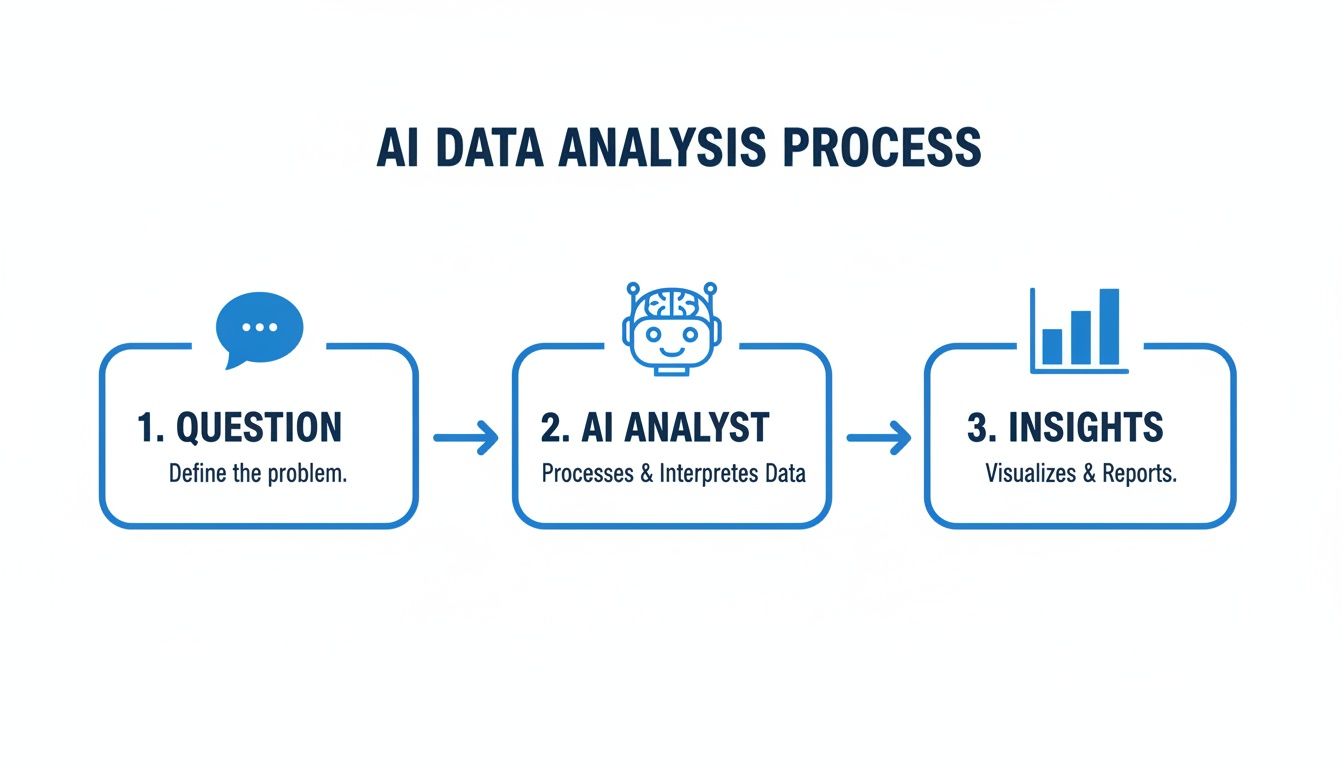
Flowchart showing the AI data analysis process: question, AI analyst, and insights with icons.

Ever wonder how an AI data assistant can take a plain English question and spit out a perfect chart, no SQL required? It might feel like magic, but it's a smart, methodical process. Think of it as having an analyst who has memorized every bit of data your company owns and understands how it all fits together. This isn't some mysterious black box. It’s a reliable workflow designed to give you trustworthy answers from your own data, securely and instantly.

Step 1: Secure Data Connection

Before anything else, we talk about security. A true AI data assistant creates a secure, read-only connection directly to where your data lives—a Postgres database, a Shopify account, or even a Google Sheet. Your data never leaves your environment. The AI is simply granted permission to query it on your behalf, just like a human analyst would. For a Conversational AI Data Analyst like Statspresso, this secure connection is the absolute foundation.

Step 2: Business Context Grounding

This is where the assistant gets its real intelligence. Once connected, the AI goes through a process we call "grounding." It analyzes your data's structure, or schema, to learn your specific business logic. It figures out that your orders table links to your customers table, and that a column named mrr means 'monthly recurring revenue.' This context is what separates a specialized tool from a generic chatbot. It knows your definition of an 'active user' because it learned directly from your data's unique setup.

Step 3: Prompt-to-Chart Pipeline

With the connection secure and the context established, you ask a question. Behind the scenes, the system uses a sophisticated process, often involving a RAG pipeline, to combine the AI's language skills with the specific business context it just learned.

Here’s a breakdown of what happens in seconds:

  1. Question Interpretation: Your prompt is analyzed for intent, metrics, and dimensions.

  2. Query Generation: The AI writes the exact SQL needed for your database schema.

  3. Data Execution: The query is run directly against your data source.

  4. Smart Visualization: The assistant picks the best way to display the results—a line chart for trends, a bar chart for comparisons, or a simple KPI.

You never see a line of code. You just get the answer. This is how modern teams skip the SQL and get straight to the insight.

Try asking Statspresso: "Show me my monthly recurring revenue growth over the last 12 months."

The Old Way vs. The New Way of Getting Data Insights
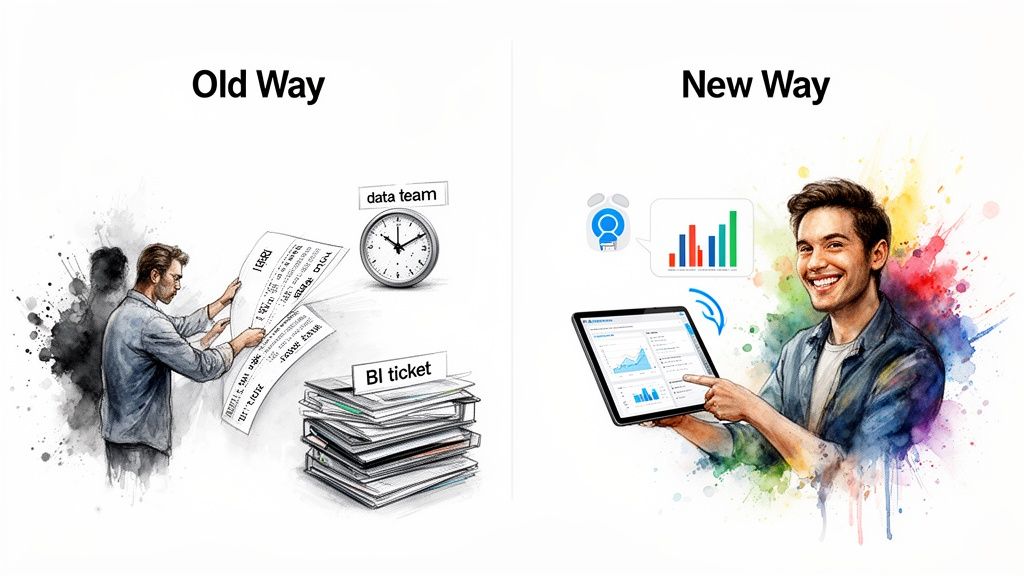
Comparison of manual data processing with modern, efficient AI data assistance on a tablet.

If you've worked in a data-driven company, you know the routine. You need a number, you file a ticket, and you wait. The gap between asking a question and getting an answer has always been the biggest bottleneck in business intelligence. An AI data assistant changes that dynamic. It's a total shift from a slow, manual process to a quick, conversational one.

The Old Way (Manual SQL)

The New Way (Statspresso)

Ask Question: Submit a ticket to the data team.

Ask Question: Type a question in plain English.

Wait: Days or weeks for an analyst to write SQL.

Get Answer: A chart appears in under 30 seconds.

Tools: Requires SQL or complex BI like Tableau.

Tools: Just a chat interface. No code needed.

Follow-up: File another ticket for a different view.

Follow-up: Ask another question to drill down instantly.

Cost: High analyst salaries and opportunity cost.

Cost: Predictable subscription. Frees up analysts.

The change is dramatic. You’re not just getting the same answers faster. You're enabling a fundamentally different way of working, where curiosity is rewarded instantly. This is what automated BI looks like in practice—it lets your team skip the SQL and get straight to the insight.

Try asking Statspresso: "Compare our revenue from Shopify vs. Amazon for last quarter as a pie chart."

A request like that used to mean a new ticket and a few days of waiting. Now, it's a simple question that gets answered in seconds.

Who Actually Benefits from an AI Data Assistant?

An AI data assistant isn't just another tool for your data team. Think of it as breaking down the walls that keep valuable insights locked away. Instead of every question going through a technical expert, anyone on your team can get answers to make smarter, faster decisions. Data stops being a slow, specialized asset and becomes an immediate, tactical resource.

For Founders and Executives

As a leader, you operate on a different clock. You can't afford to wait days for a report when you're in a board meeting. You need numbers now. An AI data assistant is like having an on-call analyst at your side, 24/7.

  • Get an instant pulse on the business: Ask for key metrics like MRR, cash flow, or CAC without hunting through spreadsheets.

  • Handle board meetings with confidence: When a director asks about a trend, get the answer live instead of saying, "I'll get back to you."

  • Steer the ship with clarity: Quickly test a hypothesis or explore an idea as it comes to you.

This isn't a niche concept; it's a massive trend. The market for intelligent virtual assistants, valued at $27.9 billion in 2025, is on track to hit $37.7 billion by 2026. Projections show it could reach $125.7 billion by 2030. You can discover more about these intelligent virtual assistant statistics to see how much this is empowering leaders.

For Product Managers

If you're a product manager, you live by user behavior data. Waiting for an analyst to pull that data creates a huge lag in your feedback loop. A Conversational AI Data Analyst like Statspresso closes that gap completely.

Try asking Statspresso: "Compare user retention for cohorts who onboarded in January vs. February."

With that instant access, your workflow changes. You can:

  • Monitor feature launches in real-time: See how many users are engaging with a new feature hours after it goes live.

  • Understand the user journey: Ask plain-English questions about user segments to find where they get stuck.

  • Build a data-backed roadmap: Use hard numbers to justify your product priorities.

For Marketing Leads

In marketing, speed is everything. You need to know which campaigns are working, which channels give you the best return, and where your best leads are coming from—right now. An AI data assistant puts all that performance data at your fingertips.

The Old Way (Manual Reporting)

The New Way (AI Data Assistant)

Wait for a weekly report to see campaign results.

Ask, "Show me leads from our latest Google Ads campaign."

Submit a ticket to analyze channel performance.

Instantly compare MQLs from LinkedIn vs. organic search.

Guess which content is driving conversions.

See which blog posts generated the most sign-ups last month.

This immediate feedback loop lets you double down on what’s working and cut what isn’t, optimizing your budget on the fly. This is the whole promise of conversational analytics: skip the SQL and get straight to the insight.

Get Your AI Data Assistant Running in Minutes
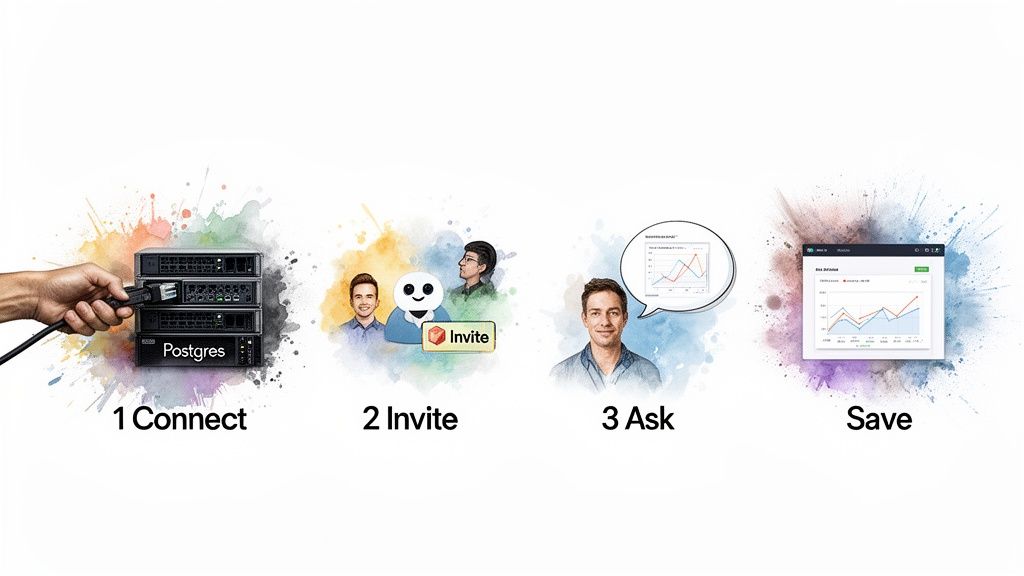
A four-step data analysis workflow: connect to Postgres, invite, ask AI, and save insights.

"New tool implementation" probably makes you think of engineering tickets and drawn-out configurations. Getting started with an AI data assistant is the opposite. With a tool like Statspresso, you can be up and running before your coffee gets cold.

Step 1: Connect Your First Data Source

This takes about two minutes. Select your data source—a Postgres database, your Shopify store, or a Google Sheet—and provide read-only credentials. Security is paramount. As a SOC 2 compliant platform, we use enterprise-grade security protocols. The AI assistant is only granted read-only access and never copies or stores your raw data.

Step 2: Invite Your Team

Next, invite the product managers, marketers, and executives who are always asking for the latest numbers. Give the people with the business questions a direct line to the answers. This one action shatters the data bottleneck.

Step 3: Ask Your First Question

This is the lightbulb moment. No training needed. Just ask a question you want answered.

Try asking Statspresso: "How many new users did we get last week, and which marketing channel brought them in?"

The instant you get back an accurate chart is the moment you'll wonder how much time you’ve been wasting.

Step 4: Save Insights to a Live Dashboard

When the AI uncovers a key insight, pin any chart or metric to a live dashboard with a single click. This builds a real-time pulse of your business, one question at a time. It’s a dynamic, living collection of your team's most critical insights.

While traditional BI tools take months to set up, you can get your first real answer from Statspresso in less time than it took to read this article. Learn more in our guide on using AI for data analysis.

Common Questions About AI Data Assistants

It’s smart to have questions before connecting your data to a new AI platform. Let's tackle the big ones.

Is My Data Secure?

Yes. For a platform like Statspresso, security is the bedrock. We're talking SOC 2 compliance, end-to-end encryption, and tight data governance. Most importantly: your raw data is never used to train some massive, public AI model. The AI assistant only sends secure, read-only queries to your database. Your data never leaves your environment.

What if I Ask a Vague Question?

This is where a true AI data assistant shines. The AI does what a human analyst would do: it asks for clarification. During setup, the assistant "grounds" itself by learning your unique data schema. It understands your definition of "active user" or "churn." If you ask to "compare sales," the assistant might ask, "Happy to! Do you want to see that by product, region, or over a specific time period?" This dialogue ensures you get accurate, trustworthy insights.

How Do I Know It's Worth It? What's the ROI?

The return on an AI data assistant boils down to two things: efficiency and opportunity.

  • Time Gained: This is the direct ROI. Think of all the hours your team spends waiting for a data pull. Every time a product manager gets an answer in seconds instead of days, that's measurable time saved.

  • Decisions Made: This is the real value. When you can test a marketing hypothesis in 30 seconds instead of 3 weeks, you catch opportunities and fix problems you otherwise would have missed.

It's not just about getting old reports faster. It's about creating a nimble, data-aware culture.

Ready to stop waiting and start asking? Statspresso acts as your Conversational AI Data Analyst, empowering your entire team to make data-driven decisions without writing a single line of SQL. Connect your first data source for free and ask your first question.

You've got a goldmine of data in Shopify, Postgres, and HubSpot. But when you need a simple number, it feels like pulling teeth. Waiting weeks for a data analyst to build a dashboard is a relic of the past. The insights are right there, locked behind a complex BI tool or a backlogged data team. This gap between urgent questions and accessible answers is a huge bottleneck. It's time to fix it.

TL;DR: Key Takeaways

  • Waiting is a competitive disadvantage. The old model of filing a ticket and waiting for a report slows your business down.

  • The problem is access, not data. You have plenty of data; the tools to analyze it were built for specialists, not for busy leaders who need answers now.

  • Conversational AI is the solution. An AI data assistant lets you skip the SQL and complex BI tools. Just ask a question in plain English and get an answer. Statspresso is your Conversational AI Data Analyst.

Your Data Is Full of Answers You Can’t Access

Man in suit at table observing floating documents and locked boxes with colorful data splashes.

Let's be blunt. The old way of getting data insights is broken for modern teams. You have a critical business question, you file a ticket, and you wait. By the time a report lands in your inbox, the moment has passed. This delay isn't just an inconvenience—it’s a real competitive disadvantage. While you’re stuck in a queue, your competition is already making data-backed decisions.

The Access and Speed Problem

The core issue isn't that you lack data. You're swimming in it. The real problem is a lack of access. Your data is siloed, and the tools built to make sense of it were designed for specialists, not for busy founders, marketers, or product managers who need answers now. Nobody has time to learn SQL on the fly or get lost in a maze of dashboard filters just to answer one question.

This forces you into a terrible choice:

  • Wrestle with the software: Waste hours trying to bend a complex BI tool to your will.

  • Wait on the experts: Add your request to the data team's ever-growing backlog.

  • Go with your gut: Make a crucial decision based on instinct because the hard data is out of reach.

None of these are good options. You need to get straight to the answer without the friction. This is exactly where a Conversational AI Data Analyst like Statspresso changes the game. It’s built on one simple promise: Skip the SQL. Just ask your data a question and get a chart in seconds. This isn't about replacing analysts; it's about empowering your entire team to find their own answers, instantly.

Meet Your New Conversational AI Data Analyst

What if you could hire a top-tier data analyst who was available 24/7, understood plain English, and turned your questions into charts in seconds? That, in a nutshell, is an AI data assistant. It's not just another generic chatbot; it's a specialized AI built to become a genuine member of your team.

Think of it as a tool that securely hooks into your business data—your Shopify sales, your Postgres user tables, your HubSpot leads—and acts as a Conversational AI Data Analyst. It's a huge shift from the rigid, pre-built dashboards of the past toward a more fluid, intuitive way of working. This approach is called Conversational Analytics or GenBI. It’s founded on a simple idea: you shouldn’t need a data science degree just to get answers about your own business.

From Static Reports to Dynamic Conversations

For years, business intelligence meant staring at static dashboards. They’re fine for tracking KPIs you already know are important, but they hit a wall the second you have a new, spontaneous question. An AI data assistant flips that script. Instead of passively looking at data, you can have a back-and-forth conversation with it.

Try asking Statspresso: "Show me my revenue by month for the last year as a bar chart."

This empowers everyone—from the founder in a board meeting to a product manager planning a sprint—to make sharp, data-backed decisions on the spot. This is why the market is exploding. Projections show the AI assistant market jumping from $3.40 billion in 2025 to $4.84 billion in 2026—a massive 42.2% annual growth rate. Experts expect the market to hit $19.63 billion by 2030. Dig deeper by reading the full report on AI assistant market growth.

How It Works Under the Hood

How does an AI assistant like Statspresso pull this off? It's a focused, three-step process combining large language models with a deep understanding of your business context.

Here’s what’s happening behind the scenes:

  • Secure Connection & Grounding: First, the assistant securely connects to your data sources. More importantly, it "grounds" itself by studying your data schema. It learns what you mean by 'active users' based on your actual tables.

  • Question to Query: When you ask, "What were our top 5 selling products last month?", the AI translates your plain English into a precise SQL query.

  • Insight to Visualization: The AI runs that query, fetches the raw numbers, and intelligently chooses the best chart to display the answer.

This is about more than just automation; it's about intelligent interpretation. A true AI data assistant doesn't just run code; it helps you figure out the right questions to ask. This is the new way of working, where you can embrace tools like an AI-assisted debugging solution that act as your conversational partner.

How an AI Data Assistant Translates Questions to Answers

Flowchart showing the AI data analysis process: question, AI analyst, and insights with icons.

Ever wonder how an AI data assistant can take a plain English question and spit out a perfect chart, no SQL required? It might feel like magic, but it's a smart, methodical process. Think of it as having an analyst who has memorized every bit of data your company owns and understands how it all fits together. This isn't some mysterious black box. It’s a reliable workflow designed to give you trustworthy answers from your own data, securely and instantly.

Step 1: Secure Data Connection

Before anything else, we talk about security. A true AI data assistant creates a secure, read-only connection directly to where your data lives—a Postgres database, a Shopify account, or even a Google Sheet. Your data never leaves your environment. The AI is simply granted permission to query it on your behalf, just like a human analyst would. For a Conversational AI Data Analyst like Statspresso, this secure connection is the absolute foundation.

Step 2: Business Context Grounding

This is where the assistant gets its real intelligence. Once connected, the AI goes through a process we call "grounding." It analyzes your data's structure, or schema, to learn your specific business logic. It figures out that your orders table links to your customers table, and that a column named mrr means 'monthly recurring revenue.' This context is what separates a specialized tool from a generic chatbot. It knows your definition of an 'active user' because it learned directly from your data's unique setup.

Step 3: Prompt-to-Chart Pipeline

With the connection secure and the context established, you ask a question. Behind the scenes, the system uses a sophisticated process, often involving a RAG pipeline, to combine the AI's language skills with the specific business context it just learned.

Here’s a breakdown of what happens in seconds:

  1. Question Interpretation: Your prompt is analyzed for intent, metrics, and dimensions.

  2. Query Generation: The AI writes the exact SQL needed for your database schema.

  3. Data Execution: The query is run directly against your data source.

  4. Smart Visualization: The assistant picks the best way to display the results—a line chart for trends, a bar chart for comparisons, or a simple KPI.

You never see a line of code. You just get the answer. This is how modern teams skip the SQL and get straight to the insight.

Try asking Statspresso: "Show me my monthly recurring revenue growth over the last 12 months."

The Old Way vs. The New Way of Getting Data Insights

Comparison of manual data processing with modern, efficient AI data assistance on a tablet.

If you've worked in a data-driven company, you know the routine. You need a number, you file a ticket, and you wait. The gap between asking a question and getting an answer has always been the biggest bottleneck in business intelligence. An AI data assistant changes that dynamic. It's a total shift from a slow, manual process to a quick, conversational one.

The Old Way (Manual SQL)

The New Way (Statspresso)

Ask Question: Submit a ticket to the data team.

Ask Question: Type a question in plain English.

Wait: Days or weeks for an analyst to write SQL.

Get Answer: A chart appears in under 30 seconds.

Tools: Requires SQL or complex BI like Tableau.

Tools: Just a chat interface. No code needed.

Follow-up: File another ticket for a different view.

Follow-up: Ask another question to drill down instantly.

Cost: High analyst salaries and opportunity cost.

Cost: Predictable subscription. Frees up analysts.

The change is dramatic. You’re not just getting the same answers faster. You're enabling a fundamentally different way of working, where curiosity is rewarded instantly. This is what automated BI looks like in practice—it lets your team skip the SQL and get straight to the insight.

Try asking Statspresso: "Compare our revenue from Shopify vs. Amazon for last quarter as a pie chart."

A request like that used to mean a new ticket and a few days of waiting. Now, it's a simple question that gets answered in seconds.

Who Actually Benefits from an AI Data Assistant?

An AI data assistant isn't just another tool for your data team. Think of it as breaking down the walls that keep valuable insights locked away. Instead of every question going through a technical expert, anyone on your team can get answers to make smarter, faster decisions. Data stops being a slow, specialized asset and becomes an immediate, tactical resource.

For Founders and Executives

As a leader, you operate on a different clock. You can't afford to wait days for a report when you're in a board meeting. You need numbers now. An AI data assistant is like having an on-call analyst at your side, 24/7.

  • Get an instant pulse on the business: Ask for key metrics like MRR, cash flow, or CAC without hunting through spreadsheets.

  • Handle board meetings with confidence: When a director asks about a trend, get the answer live instead of saying, "I'll get back to you."

  • Steer the ship with clarity: Quickly test a hypothesis or explore an idea as it comes to you.

This isn't a niche concept; it's a massive trend. The market for intelligent virtual assistants, valued at $27.9 billion in 2025, is on track to hit $37.7 billion by 2026. Projections show it could reach $125.7 billion by 2030. You can discover more about these intelligent virtual assistant statistics to see how much this is empowering leaders.

For Product Managers

If you're a product manager, you live by user behavior data. Waiting for an analyst to pull that data creates a huge lag in your feedback loop. A Conversational AI Data Analyst like Statspresso closes that gap completely.

Try asking Statspresso: "Compare user retention for cohorts who onboarded in January vs. February."

With that instant access, your workflow changes. You can:

  • Monitor feature launches in real-time: See how many users are engaging with a new feature hours after it goes live.

  • Understand the user journey: Ask plain-English questions about user segments to find where they get stuck.

  • Build a data-backed roadmap: Use hard numbers to justify your product priorities.

For Marketing Leads

In marketing, speed is everything. You need to know which campaigns are working, which channels give you the best return, and where your best leads are coming from—right now. An AI data assistant puts all that performance data at your fingertips.

The Old Way (Manual Reporting)

The New Way (AI Data Assistant)

Wait for a weekly report to see campaign results.

Ask, "Show me leads from our latest Google Ads campaign."

Submit a ticket to analyze channel performance.

Instantly compare MQLs from LinkedIn vs. organic search.

Guess which content is driving conversions.

See which blog posts generated the most sign-ups last month.

This immediate feedback loop lets you double down on what’s working and cut what isn’t, optimizing your budget on the fly. This is the whole promise of conversational analytics: skip the SQL and get straight to the insight.

Get Your AI Data Assistant Running in Minutes

A four-step data analysis workflow: connect to Postgres, invite, ask AI, and save insights.

"New tool implementation" probably makes you think of engineering tickets and drawn-out configurations. Getting started with an AI data assistant is the opposite. With a tool like Statspresso, you can be up and running before your coffee gets cold.

Step 1: Connect Your First Data Source

This takes about two minutes. Select your data source—a Postgres database, your Shopify store, or a Google Sheet—and provide read-only credentials. Security is paramount. As a SOC 2 compliant platform, we use enterprise-grade security protocols. The AI assistant is only granted read-only access and never copies or stores your raw data.

Step 2: Invite Your Team

Next, invite the product managers, marketers, and executives who are always asking for the latest numbers. Give the people with the business questions a direct line to the answers. This one action shatters the data bottleneck.

Step 3: Ask Your First Question

This is the lightbulb moment. No training needed. Just ask a question you want answered.

Try asking Statspresso: "How many new users did we get last week, and which marketing channel brought them in?"

The instant you get back an accurate chart is the moment you'll wonder how much time you’ve been wasting.

Step 4: Save Insights to a Live Dashboard

When the AI uncovers a key insight, pin any chart or metric to a live dashboard with a single click. This builds a real-time pulse of your business, one question at a time. It’s a dynamic, living collection of your team's most critical insights.

While traditional BI tools take months to set up, you can get your first real answer from Statspresso in less time than it took to read this article. Learn more in our guide on using AI for data analysis.

Common Questions About AI Data Assistants

It’s smart to have questions before connecting your data to a new AI platform. Let's tackle the big ones.

Is My Data Secure?

Yes. For a platform like Statspresso, security is the bedrock. We're talking SOC 2 compliance, end-to-end encryption, and tight data governance. Most importantly: your raw data is never used to train some massive, public AI model. The AI assistant only sends secure, read-only queries to your database. Your data never leaves your environment.

What if I Ask a Vague Question?

This is where a true AI data assistant shines. The AI does what a human analyst would do: it asks for clarification. During setup, the assistant "grounds" itself by learning your unique data schema. It understands your definition of "active user" or "churn." If you ask to "compare sales," the assistant might ask, "Happy to! Do you want to see that by product, region, or over a specific time period?" This dialogue ensures you get accurate, trustworthy insights.

How Do I Know It's Worth It? What's the ROI?

The return on an AI data assistant boils down to two things: efficiency and opportunity.

  • Time Gained: This is the direct ROI. Think of all the hours your team spends waiting for a data pull. Every time a product manager gets an answer in seconds instead of days, that's measurable time saved.

  • Decisions Made: This is the real value. When you can test a marketing hypothesis in 30 seconds instead of 3 weeks, you catch opportunities and fix problems you otherwise would have missed.

It's not just about getting old reports faster. It's about creating a nimble, data-aware culture.

Ready to stop waiting and start asking? Statspresso acts as your Conversational AI Data Analyst, empowering your entire team to make data-driven decisions without writing a single line of SQL. Connect your first data source for free and ask your first question.

You've got a goldmine of data in Shopify, Postgres, and HubSpot. But when you need a simple number, it feels like pulling teeth. Waiting weeks for a data analyst to build a dashboard is a relic of the past. The insights are right there, locked behind a complex BI tool or a backlogged data team. This gap between urgent questions and accessible answers is a huge bottleneck. It's time to fix it.

TL;DR: Key Takeaways

  • Waiting is a competitive disadvantage. The old model of filing a ticket and waiting for a report slows your business down.

  • The problem is access, not data. You have plenty of data; the tools to analyze it were built for specialists, not for busy leaders who need answers now.

  • Conversational AI is the solution. An AI data assistant lets you skip the SQL and complex BI tools. Just ask a question in plain English and get an answer. Statspresso is your Conversational AI Data Analyst.

Your Data Is Full of Answers You Can’t Access

Man in suit at table observing floating documents and locked boxes with colorful data splashes.

Let's be blunt. The old way of getting data insights is broken for modern teams. You have a critical business question, you file a ticket, and you wait. By the time a report lands in your inbox, the moment has passed. This delay isn't just an inconvenience—it’s a real competitive disadvantage. While you’re stuck in a queue, your competition is already making data-backed decisions.

The Access and Speed Problem

The core issue isn't that you lack data. You're swimming in it. The real problem is a lack of access. Your data is siloed, and the tools built to make sense of it were designed for specialists, not for busy founders, marketers, or product managers who need answers now. Nobody has time to learn SQL on the fly or get lost in a maze of dashboard filters just to answer one question.

This forces you into a terrible choice:

  • Wrestle with the software: Waste hours trying to bend a complex BI tool to your will.

  • Wait on the experts: Add your request to the data team's ever-growing backlog.

  • Go with your gut: Make a crucial decision based on instinct because the hard data is out of reach.

None of these are good options. You need to get straight to the answer without the friction. This is exactly where a Conversational AI Data Analyst like Statspresso changes the game. It’s built on one simple promise: Skip the SQL. Just ask your data a question and get a chart in seconds. This isn't about replacing analysts; it's about empowering your entire team to find their own answers, instantly.

Meet Your New Conversational AI Data Analyst

What if you could hire a top-tier data analyst who was available 24/7, understood plain English, and turned your questions into charts in seconds? That, in a nutshell, is an AI data assistant. It's not just another generic chatbot; it's a specialized AI built to become a genuine member of your team.

Think of it as a tool that securely hooks into your business data—your Shopify sales, your Postgres user tables, your HubSpot leads—and acts as a Conversational AI Data Analyst. It's a huge shift from the rigid, pre-built dashboards of the past toward a more fluid, intuitive way of working. This approach is called Conversational Analytics or GenBI. It’s founded on a simple idea: you shouldn’t need a data science degree just to get answers about your own business.

From Static Reports to Dynamic Conversations

For years, business intelligence meant staring at static dashboards. They’re fine for tracking KPIs you already know are important, but they hit a wall the second you have a new, spontaneous question. An AI data assistant flips that script. Instead of passively looking at data, you can have a back-and-forth conversation with it.

Try asking Statspresso: "Show me my revenue by month for the last year as a bar chart."

This empowers everyone—from the founder in a board meeting to a product manager planning a sprint—to make sharp, data-backed decisions on the spot. This is why the market is exploding. Projections show the AI assistant market jumping from $3.40 billion in 2025 to $4.84 billion in 2026—a massive 42.2% annual growth rate. Experts expect the market to hit $19.63 billion by 2030. Dig deeper by reading the full report on AI assistant market growth.

How It Works Under the Hood

How does an AI assistant like Statspresso pull this off? It's a focused, three-step process combining large language models with a deep understanding of your business context.

Here’s what’s happening behind the scenes:

  • Secure Connection & Grounding: First, the assistant securely connects to your data sources. More importantly, it "grounds" itself by studying your data schema. It learns what you mean by 'active users' based on your actual tables.

  • Question to Query: When you ask, "What were our top 5 selling products last month?", the AI translates your plain English into a precise SQL query.

  • Insight to Visualization: The AI runs that query, fetches the raw numbers, and intelligently chooses the best chart to display the answer.

This is about more than just automation; it's about intelligent interpretation. A true AI data assistant doesn't just run code; it helps you figure out the right questions to ask. This is the new way of working, where you can embrace tools like an AI-assisted debugging solution that act as your conversational partner.

How an AI Data Assistant Translates Questions to Answers

Flowchart showing the AI data analysis process: question, AI analyst, and insights with icons.

Ever wonder how an AI data assistant can take a plain English question and spit out a perfect chart, no SQL required? It might feel like magic, but it's a smart, methodical process. Think of it as having an analyst who has memorized every bit of data your company owns and understands how it all fits together. This isn't some mysterious black box. It’s a reliable workflow designed to give you trustworthy answers from your own data, securely and instantly.

Step 1: Secure Data Connection

Before anything else, we talk about security. A true AI data assistant creates a secure, read-only connection directly to where your data lives—a Postgres database, a Shopify account, or even a Google Sheet. Your data never leaves your environment. The AI is simply granted permission to query it on your behalf, just like a human analyst would. For a Conversational AI Data Analyst like Statspresso, this secure connection is the absolute foundation.

Step 2: Business Context Grounding

This is where the assistant gets its real intelligence. Once connected, the AI goes through a process we call "grounding." It analyzes your data's structure, or schema, to learn your specific business logic. It figures out that your orders table links to your customers table, and that a column named mrr means 'monthly recurring revenue.' This context is what separates a specialized tool from a generic chatbot. It knows your definition of an 'active user' because it learned directly from your data's unique setup.

Step 3: Prompt-to-Chart Pipeline

With the connection secure and the context established, you ask a question. Behind the scenes, the system uses a sophisticated process, often involving a RAG pipeline, to combine the AI's language skills with the specific business context it just learned.

Here’s a breakdown of what happens in seconds:

  1. Question Interpretation: Your prompt is analyzed for intent, metrics, and dimensions.

  2. Query Generation: The AI writes the exact SQL needed for your database schema.

  3. Data Execution: The query is run directly against your data source.

  4. Smart Visualization: The assistant picks the best way to display the results—a line chart for trends, a bar chart for comparisons, or a simple KPI.

You never see a line of code. You just get the answer. This is how modern teams skip the SQL and get straight to the insight.

Try asking Statspresso: "Show me my monthly recurring revenue growth over the last 12 months."

The Old Way vs. The New Way of Getting Data Insights

Comparison of manual data processing with modern, efficient AI data assistance on a tablet.

If you've worked in a data-driven company, you know the routine. You need a number, you file a ticket, and you wait. The gap between asking a question and getting an answer has always been the biggest bottleneck in business intelligence. An AI data assistant changes that dynamic. It's a total shift from a slow, manual process to a quick, conversational one.

The Old Way (Manual SQL)

The New Way (Statspresso)

Ask Question: Submit a ticket to the data team.

Ask Question: Type a question in plain English.

Wait: Days or weeks for an analyst to write SQL.

Get Answer: A chart appears in under 30 seconds.

Tools: Requires SQL or complex BI like Tableau.

Tools: Just a chat interface. No code needed.

Follow-up: File another ticket for a different view.

Follow-up: Ask another question to drill down instantly.

Cost: High analyst salaries and opportunity cost.

Cost: Predictable subscription. Frees up analysts.

The change is dramatic. You’re not just getting the same answers faster. You're enabling a fundamentally different way of working, where curiosity is rewarded instantly. This is what automated BI looks like in practice—it lets your team skip the SQL and get straight to the insight.

Try asking Statspresso: "Compare our revenue from Shopify vs. Amazon for last quarter as a pie chart."

A request like that used to mean a new ticket and a few days of waiting. Now, it's a simple question that gets answered in seconds.

Who Actually Benefits from an AI Data Assistant?

An AI data assistant isn't just another tool for your data team. Think of it as breaking down the walls that keep valuable insights locked away. Instead of every question going through a technical expert, anyone on your team can get answers to make smarter, faster decisions. Data stops being a slow, specialized asset and becomes an immediate, tactical resource.

For Founders and Executives

As a leader, you operate on a different clock. You can't afford to wait days for a report when you're in a board meeting. You need numbers now. An AI data assistant is like having an on-call analyst at your side, 24/7.

  • Get an instant pulse on the business: Ask for key metrics like MRR, cash flow, or CAC without hunting through spreadsheets.

  • Handle board meetings with confidence: When a director asks about a trend, get the answer live instead of saying, "I'll get back to you."

  • Steer the ship with clarity: Quickly test a hypothesis or explore an idea as it comes to you.

This isn't a niche concept; it's a massive trend. The market for intelligent virtual assistants, valued at $27.9 billion in 2025, is on track to hit $37.7 billion by 2026. Projections show it could reach $125.7 billion by 2030. You can discover more about these intelligent virtual assistant statistics to see how much this is empowering leaders.

For Product Managers

If you're a product manager, you live by user behavior data. Waiting for an analyst to pull that data creates a huge lag in your feedback loop. A Conversational AI Data Analyst like Statspresso closes that gap completely.

Try asking Statspresso: "Compare user retention for cohorts who onboarded in January vs. February."

With that instant access, your workflow changes. You can:

  • Monitor feature launches in real-time: See how many users are engaging with a new feature hours after it goes live.

  • Understand the user journey: Ask plain-English questions about user segments to find where they get stuck.

  • Build a data-backed roadmap: Use hard numbers to justify your product priorities.

For Marketing Leads

In marketing, speed is everything. You need to know which campaigns are working, which channels give you the best return, and where your best leads are coming from—right now. An AI data assistant puts all that performance data at your fingertips.

The Old Way (Manual Reporting)

The New Way (AI Data Assistant)

Wait for a weekly report to see campaign results.

Ask, "Show me leads from our latest Google Ads campaign."

Submit a ticket to analyze channel performance.

Instantly compare MQLs from LinkedIn vs. organic search.

Guess which content is driving conversions.

See which blog posts generated the most sign-ups last month.

This immediate feedback loop lets you double down on what’s working and cut what isn’t, optimizing your budget on the fly. This is the whole promise of conversational analytics: skip the SQL and get straight to the insight.

Get Your AI Data Assistant Running in Minutes

A four-step data analysis workflow: connect to Postgres, invite, ask AI, and save insights.

"New tool implementation" probably makes you think of engineering tickets and drawn-out configurations. Getting started with an AI data assistant is the opposite. With a tool like Statspresso, you can be up and running before your coffee gets cold.

Step 1: Connect Your First Data Source

This takes about two minutes. Select your data source—a Postgres database, your Shopify store, or a Google Sheet—and provide read-only credentials. Security is paramount. As a SOC 2 compliant platform, we use enterprise-grade security protocols. The AI assistant is only granted read-only access and never copies or stores your raw data.

Step 2: Invite Your Team

Next, invite the product managers, marketers, and executives who are always asking for the latest numbers. Give the people with the business questions a direct line to the answers. This one action shatters the data bottleneck.

Step 3: Ask Your First Question

This is the lightbulb moment. No training needed. Just ask a question you want answered.

Try asking Statspresso: "How many new users did we get last week, and which marketing channel brought them in?"

The instant you get back an accurate chart is the moment you'll wonder how much time you’ve been wasting.

Step 4: Save Insights to a Live Dashboard

When the AI uncovers a key insight, pin any chart or metric to a live dashboard with a single click. This builds a real-time pulse of your business, one question at a time. It’s a dynamic, living collection of your team's most critical insights.

While traditional BI tools take months to set up, you can get your first real answer from Statspresso in less time than it took to read this article. Learn more in our guide on using AI for data analysis.

Common Questions About AI Data Assistants

It’s smart to have questions before connecting your data to a new AI platform. Let's tackle the big ones.

Is My Data Secure?

Yes. For a platform like Statspresso, security is the bedrock. We're talking SOC 2 compliance, end-to-end encryption, and tight data governance. Most importantly: your raw data is never used to train some massive, public AI model. The AI assistant only sends secure, read-only queries to your database. Your data never leaves your environment.

What if I Ask a Vague Question?

This is where a true AI data assistant shines. The AI does what a human analyst would do: it asks for clarification. During setup, the assistant "grounds" itself by learning your unique data schema. It understands your definition of "active user" or "churn." If you ask to "compare sales," the assistant might ask, "Happy to! Do you want to see that by product, region, or over a specific time period?" This dialogue ensures you get accurate, trustworthy insights.

How Do I Know It's Worth It? What's the ROI?

The return on an AI data assistant boils down to two things: efficiency and opportunity.

  • Time Gained: This is the direct ROI. Think of all the hours your team spends waiting for a data pull. Every time a product manager gets an answer in seconds instead of days, that's measurable time saved.

  • Decisions Made: This is the real value. When you can test a marketing hypothesis in 30 seconds instead of 3 weeks, you catch opportunities and fix problems you otherwise would have missed.

It's not just about getting old reports faster. It's about creating a nimble, data-aware culture.

Ready to stop waiting and start asking? Statspresso acts as your Conversational AI Data Analyst, empowering your entire team to make data-driven decisions without writing a single line of SQL. Connect your first data source for free and ask your first question.