Feb 28, 2026

What Is an AI Data Analyst and Why You Need One

Your team has urgent questions right now. "What's our churn rate?" "Which campaign drove the most sign-ups?" The answers are locked in your database, waiting for a developer to write a query. Waiting weeks for a data analyst to build a dashboard is a relic of the past. That delay is costing you money.

This guide explains how a new type of tool—a Conversational AI Data Analyst—gives you answers in seconds.

TL;DR: Key Takeaways

  • The Problem: Waiting for data experts to write SQL creates a massive bottleneck. Your team is forced to make decisions based on gut feelings instead of real-time data.

  • The Solution: An AI data analyst is software that understands plain English questions, automatically writes the code, and delivers charts and insights in seconds.

  • The Benefit: Your entire team—founders, marketers, product managers—can get answers directly from your data. No technical skills are needed.

  • The How: Tools like Statspresso act as a Conversational AI Data Analyst. You skip the SQL. Just ask your data a question and get a chart in seconds.

The Data Bottleneck Is a Relic of the Past

Three concerned professionals wait as an hourglass runs, beside a locked server rack, symbolizing data security and urgency.

Waiting days—or weeks—for a swamped data analyst to build a dashboard is an obsolete way of working. It’s a painful bottleneck that leaves your team flying blind.

When answers are slow, opportunities are lost. Simple as that.

  • Marketing leads can't react quickly to optimize live campaigns.

  • Product managers are left guessing about feature usage instead of knowing.

  • Founders struggle to track fundamental metrics, like MRR, in real-time.

This outdated process hinges on a few technical experts who have to translate plain business questions into complex SQL. The result is always the same: a long queue of data requests and a team of decision-makers forced to rely on gut feelings.

A New Way to Get Answers

The fix isn't hiring more analysts. It's changing how your team accesses data. What if anyone could get answers directly from your database, just by asking a question in plain English?

This is the power of a modern AI data analyst. It’s a new category of automated BI that removes the technical walls between your people and your data. Instead of filing a ticket and waiting, you just ask.

An AI data analyst acts as a translator between human language and machine language. It understands your question, writes the code, and gives you a chart in seconds.

A founder, for example, can get an instant pulse on the business without any technical help.

  • Try asking Statspresso: “Show me my new monthly recurring revenue (MRR) for the past six months as a line chart.”

This move toward conversational analytics is a competitive advantage. The market for AI in data analytics is projected to grow nearly tenfold by 2034. Why? Because businesses that get faster answers make better, quicker decisions. The old way is being replaced by tools like Statspresso, a Conversational AI Data Analyst, that let your team skip the SQL and just ask your data a question.

How an AI Data Analyst Actually Works
A man speaks into a microphone, visualizing data from a database with a speech bubble showing a bar chart.

Let's cut through the noise. An AI data analyst isn't a robot. It's a software layer acting as a super-fast translator between plain English and technical database languages like SQL.

When you ask it a question, it kicks off a lightning-fast, three-step process behind the scenes.

From Question to Query

First, the system uses Natural Language Processing (NLP) to figure out what you want. When you type, "Show me our top 5 products by revenue last quarter," the NLP dissects your request into its core components: the metric (revenue), the dimension (products), the filter (last quarter), and the limit (five).

It's just like briefing a human analyst, but the AI understands the intent behind your words. This is the heart of conversational analytics—making data feel less like a chore and more like a chat.

This shift is what's fueling massive industry growth. The AI in data analytics market was valued at USD 31.22 billion in 2025 and is on track to reach a staggering USD 310.97 billion by 2034. Why the explosion? Businesses need faster ways to get answers. You can dig into the full report on this market expansion to see why GenBI is quickly becoming a must-have.

Automated Data Retrieval and Analysis

Once the AI understands your question, it automatically writes the SQL code needed to pull that information from your database. This is where the magic happens. You get to skip the SQL completely.

The AI writes, runs, and checks the query for you. This is a huge leap from traditional BI tools where you're stuck manually building queries. An AI data analyst shoulders that technical burden.

A Conversational AI Data Analyst like Statspresso connects securely to your data sources with read-only permissions. It translates your question, fetches the data, and then immediately forgets the query. Your underlying data is never touched.

Generating Charts and Summaries

Finally, the system takes the raw data and uses generative AI to present it in the most logical format—a bar chart, a line graph, or just a single number. It can also provide a plain-English summary of what the data means. This closes the loop, turning raw numbers into a clear insight you can actually use.

  • Try asking Statspresso: "What was our average customer lifetime value for users who signed up in Q2, broken down by acquisition source?"

This entire workflow—from your question to a finished chart—is over in seconds. It’s a real-world example of automated BI in action, putting powerful data analysis directly into the hands of founders, marketers, and product managers.

The Old Way vs. The New Way

How does an AI data analyst compare to the old-school, manual way of doing things? The difference is more than speed—it’s a complete overhaul of who gets data and how fast your business can move.

From Days and Weeks to Instant Answers

Imagine your marketing manager wants to know which channels bring in the most valuable customers. Traditionally, this kicks off a slow, painful process: file a ticket, wait, clarify requirements, wait for an analyst to write SQL, and finally get a static chart in Tableau. Days—or weeks—later, marketing gets a report. The opportunity is gone.

This is why most teams aren't truly data-driven. A Conversational AI Data Analyst flips the script entirely.

An AI Data Analyst like Statspresso makes data accessible to everyone. It gives your entire team the power to make decisions based on live data, not a gut feeling. Skip the SQL. Just ask your data a question and get a chart in seconds.

Manual Analytics vs. AI Data Analyst Workflow

The contrast between the old manual process and a conversational AI tool is stark.

Feature

The Old Way (Manual SQL)

The New Way (Statspresso)

Time to Insight

Days or Weeks

Seconds

Required Skills

SQL, Tableau/Power BI expertise

Ability to ask a question in English

The Workflow

1. Submit ticket
2. Wait in queue
3. Analyst writes SQL
4. Analyst builds dashboard
5. Receive static report

1. Ask a question
2. Get an interactive chart

Accessibility

Limited to data experts

Open to everyone

Output

Static, often outdated reports

Interactive, real-time charts

The AI-powered approach doesn't just speed things up; it removes nearly all the friction. Instead of your team being constantly blocked, they are empowered to explore and find answers on their own.

  • Try asking Statspresso: “Show me our top 10 customers by lifetime value as a bar chart.”

That simple question does the work that used to take an analyst days. It’s the difference between driving while staring in the rearview mirror and having a real-time GPS guiding your next turn.

3 Practical Use Cases for Your Business Today

Theory is great, but results matter more. An AI data analyst is a practical tool that delivers immediate value. Its real power is turning a simple business question into a critical insight in seconds.

This visual shows just how much cleaner the modern workflow is compared to the old way.
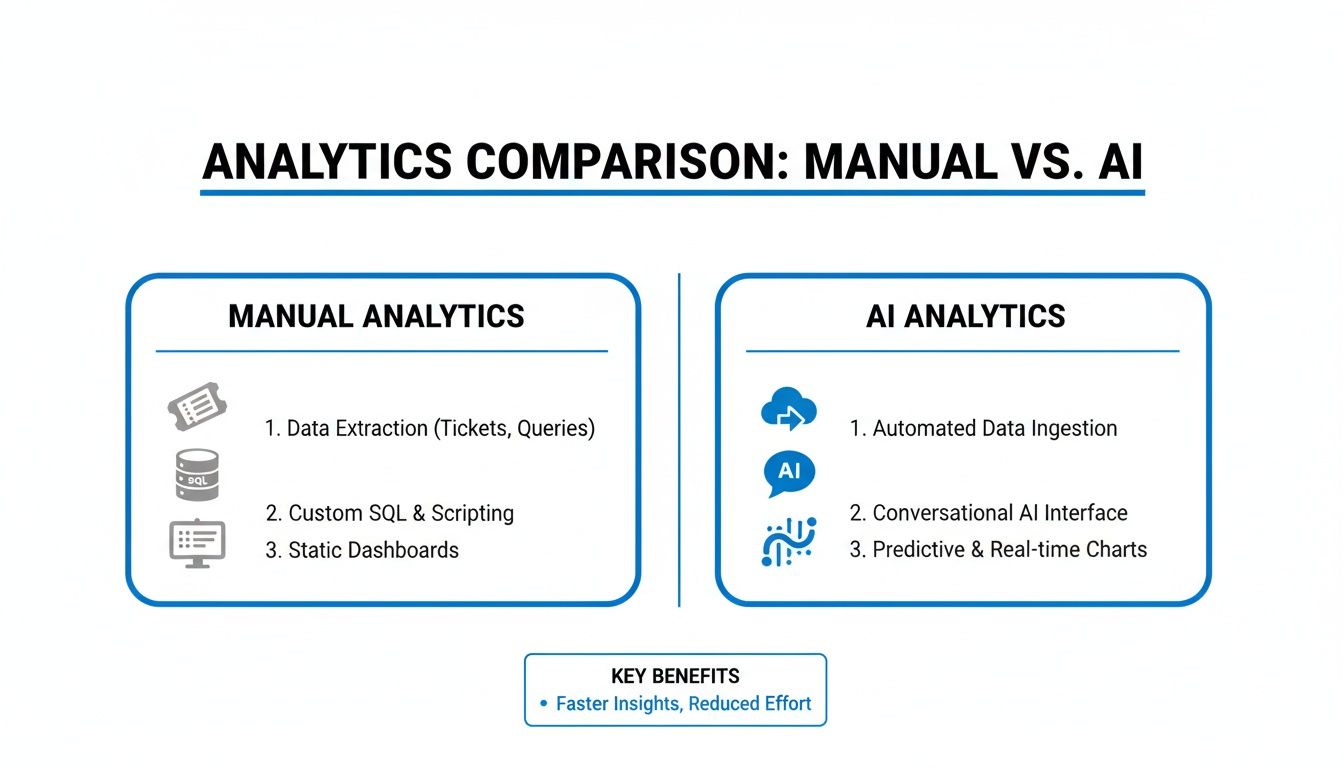
A diagram comparing manual analytics features like data extraction and static dashboards with AI analytics features such as automated data ingestion and predictive charts.

A Conversational AI Data Analyst like Statspresso cuts out all the middle steps. No ticketing, no coding, no building dashboards. You go straight from question to chart. Let's look at three concrete examples.

For Founders and CEOs: Instant Financial Health Checks

Founders live and die by their numbers. Crucial metrics like Monthly Recurring Revenue (MRR) are often buried in a data team's backlog. Waiting a week for a report on last month's performance is too slow.

An AI data analyst flips that dynamic. Instead of waiting for a summary, you get a live view of your most important financials anytime.

Try asking Statspresso: "What was our MRR growth month-over-month for the last 12 months? Show it as a bar chart."

With a Conversational AI Data Analyst like Statspresso, you can immediately ask follow-up questions to dig deeper. This turns a static number into a dynamic conversation, letting you spot trends and tackle issues the moment they appear.

For Marketing Leads: Real-Time Campaign Optimization

Marketing is a game of speed. Every dollar spent on an underperforming campaign is wasted. The problem is that performance data from places like Google Ads is often tough to analyze without technical help.

By the time you get a report, the chance to reallocate your budget is long gone. An AI data analyst puts the power of analysis directly into the hands of the marketing team.

  • Self-Serve Insights: No more bugging the data team for performance stats.

  • Faster Decisions: Get immediate feedback on which channels drive the highest conversion rates.

  • Better ROI: Optimize ad spend based on live data, not stale summaries.

This workflow, a key piece of automated BI, lets marketers independently measure their impact. You can finally skip the SQL and just ask your data a question about what's working.

Try asking Statspresso: "Compare conversion rates for our Google Ads and Facebook Ads campaigns this quarter."

For Product Managers: Instant Feature Adoption Feedback

Product managers often fly blind without concrete usage data. Answering "Are people actually using the new feature?" can take days of a developer's time.

That delay forces PMs to make decisions based on gut feelings. Conversational analytics solves this by giving them an instant line into the product's database.

Imagine checking daily active users for a new feature hours after it goes live. You can see right away if your launch is a hit or needs attention—all without writing a single line of code.

Try asking Statspresso: "Show me the daily active users for our new 'Project Planner' feature since launch."

This immediate feedback loop is essential for building products that stick. It helps create a culture of data-backed iteration and ensures your development resources are focused on what truly matters to users.

What an AI Analyst Can (and Can't) Do Right Now

An AI data analyst sounds great, but you can't trust a tool until you understand its limits. Let's have a frank discussion about what an AI data analyst is great at today and where you absolutely still need a human expert.

What an AI Data Analyst Does Exceptionally Well

The most obvious win is pure speed. A query that takes a human analyst an hour can be handled by an AI in seconds. This fundamentally changes your analytics process.

This speed makes another benefit possible: democratizing data access. For the first time, anyone who can type a question can get an answer backed by real data. A product manager, founder, or marketer no longer has to learn SQL or wait in a queue. This is why 62% of enterprises report improved decision-making speed after adopting AI data analysis software, according to the latest AI data software market analysis.

Beyond answering questions, an AI data analyst is a pro at automated pattern detection. It can proactively flag anomalies or interesting correlations you wouldn't have thought to look for.

  • Blazing-Fast Speed: Turns questions into charts in seconds, not days.

  • Accessibility for Everyone: If you can ask a question, you can analyze data.

  • Automated Pattern Discovery: Surfaces hidden trends and outliers without being prompted.

Where Human Expertise Is Still Essential

Okay, reality check. An AI data analyst is powerful, but it’s not a cure-all. Its performance is completely dependent on the quality of your data. Garbage in, garbage out.

An AI analyst needs clean, structured data from sources like a Postgres database, Shopify, or HubSpot. If your data is a tangled mess, the AI will struggle. This is where a human data professional is invaluable—they build the clean, reliable data pipelines that make conversational analytics work.

Another limitation is dealing with highly ambiguous questions. Ask it, "Are our customers happy?" and it will hit a wall. An AI lacks strategic context. A human would translate that into measurable metrics like NPS, churn rate, and repeat purchase frequency.

Try asking Statspresso: "What is our average customer satisfaction score from the last survey, grouped by user segment?"
This is a specific, answerable question that leverages clean data.

A Conversational AI Data Analyst like Statspresso is built to help bridge this gap by making it easy to ask precise questions. But for deep, exploratory research, a human analyst’s strategic guidance is irreplaceable. The AI is a brilliant first mate, but you still need a captain to chart the course.

How to Implement an AI Data Analyst in Your Workflow

Alright, so we've covered the "what" and the "why." Now for the "how." Bringing an AI data analyst into your workflow isn’t a massive IT overhaul. The process is designed to be quick and deliver value from the first question. Let's walk through it in four simple steps.

Step 1: Identify Your Core Data Sources

First: where does your most important data live? Don't connect everything at once. Start with one or two critical platforms.

Think about the systems you check every day.

Pick one. The one with the answers you need most urgently.

Step 2: Connect Your First Source Securely

This part shouldn't be nerve-wracking. Connecting a data source to a platform like Statspresso is simple and secure. Modern tools use read-only connections, meaning the AI can look at your data but can never, ever change it.

It's like giving someone a library card to read books, not a key to rewrite them. Your data is safe, period.

The rise of secure, accessible automated BI is changing how companies operate. The big data analytics market is projected to surge from $18.6 billion in 2025 to over $79 billion by 2033, driven by this need for faster, safer insights. You can read more in this global market analysis.

Step 3: Ask a Simple, Confidence-Building Question

Now for the fun part. Don't start by trying to solve a huge problem. Begin with a question where you already know the answer. This is how you build trust in the system.

It’s like testing a new calculator by typing "2+2." You know the answer should be 4, and seeing it confirms the tool works.

Try asking Statspresso: "How many new users signed up last week?"

When the correct number pops up in seconds, you'll have that "aha!" moment. You just got a real answer from your database without writing SQL. For more on this, check out our guide on using AI for data analysis.

Step 4: Build Your First Live Dashboard

As you have these conversations with your data, you'll uncover useful charts and metrics. A Conversational AI Data Analyst like Statspresso lets you "pin" these findings to a live dashboard with one click.

Rather than building a dashboard from scratch, you assemble it from the insights that emerge from your questions. That way, your dashboard becomes a living view of what matters most, created from your own curiosity.

This process makes adopting an AI data analyst a low-risk, high-reward decision. It’s all about empowering your team to skip the SQL and just ask your data a question.

Common Questions About AI Data Analysts

Bringing any new tool into the fold raises questions. As a data consultant, I hear the same smart concerns from founders all the time. Let's tackle them head-on.

Will It Replace Our Human Data Analysts?

Absolutely not. The goal is augmentation, not replacement. Think of an AI data analyst as a force multiplier for your data team. It handles the repetitive, time-consuming queries that clog up the backlog—like pulling weekly sales numbers.

This frees up your human analysts to focus on what they do best:

  • High-level strategy: Answering complex, ambiguous business questions.

  • Deep-dive investigations: Uncovering the "why" behind the numbers the AI surfaces.

  • Data governance: Ensuring the underlying data is clean, reliable, and ready for analysis.

Your team gets faster answers to routine questions, and your analysts get to focus on high-impact work. It's a win-win.

How Secure Is Connecting Our Database?

This is the most important question. Security is paramount. Any reputable tool, like Statspresso, is built with multiple layers of protection.

Here are the key security measures you should look for:

  • Read-Only Access: The AI should only ever be granted permission to read your data, never to write, change, or delete anything.

  • End-to-End Encryption: Your data should be encrypted both in transit (while being queried) and at rest (when stored).

  • SOC 2 Compliance: The best tools undergo rigorous third-party audits to certify their security controls meet the highest standards.

How Is This Different from ChatGPT?

It’s a crucial distinction. Comparing them is like contrasting a specialized surgical tool with a general-purpose pocket knife. ChatGPT is a generalist; it pulls knowledge from the public internet.

A Conversational AI Data Analyst like Statspresso is a specialist. It’s designed to do a few things extremely well:

  • Query private, proprietary data securely from your databases.

  • Provide verifiable answers grounded entirely in your business reality.

  • Generate accurate charts based on your real numbers, not public information.

With a specialized tool, you get answers you can actually trust to run your business. Ready to see for yourself?

Connect your first data source for free and ask your first question.

Your team has urgent questions right now. "What's our churn rate?" "Which campaign drove the most sign-ups?" The answers are locked in your database, waiting for a developer to write a query. Waiting weeks for a data analyst to build a dashboard is a relic of the past. That delay is costing you money.

This guide explains how a new type of tool—a Conversational AI Data Analyst—gives you answers in seconds.

TL;DR: Key Takeaways

  • The Problem: Waiting for data experts to write SQL creates a massive bottleneck. Your team is forced to make decisions based on gut feelings instead of real-time data.

  • The Solution: An AI data analyst is software that understands plain English questions, automatically writes the code, and delivers charts and insights in seconds.

  • The Benefit: Your entire team—founders, marketers, product managers—can get answers directly from your data. No technical skills are needed.

  • The How: Tools like Statspresso act as a Conversational AI Data Analyst. You skip the SQL. Just ask your data a question and get a chart in seconds.

The Data Bottleneck Is a Relic of the Past

Three concerned professionals wait as an hourglass runs, beside a locked server rack, symbolizing data security and urgency.

Waiting days—or weeks—for a swamped data analyst to build a dashboard is an obsolete way of working. It’s a painful bottleneck that leaves your team flying blind.

When answers are slow, opportunities are lost. Simple as that.

  • Marketing leads can't react quickly to optimize live campaigns.

  • Product managers are left guessing about feature usage instead of knowing.

  • Founders struggle to track fundamental metrics, like MRR, in real-time.

This outdated process hinges on a few technical experts who have to translate plain business questions into complex SQL. The result is always the same: a long queue of data requests and a team of decision-makers forced to rely on gut feelings.

A New Way to Get Answers

The fix isn't hiring more analysts. It's changing how your team accesses data. What if anyone could get answers directly from your database, just by asking a question in plain English?

This is the power of a modern AI data analyst. It’s a new category of automated BI that removes the technical walls between your people and your data. Instead of filing a ticket and waiting, you just ask.

An AI data analyst acts as a translator between human language and machine language. It understands your question, writes the code, and gives you a chart in seconds.

A founder, for example, can get an instant pulse on the business without any technical help.

  • Try asking Statspresso: “Show me my new monthly recurring revenue (MRR) for the past six months as a line chart.”

This move toward conversational analytics is a competitive advantage. The market for AI in data analytics is projected to grow nearly tenfold by 2034. Why? Because businesses that get faster answers make better, quicker decisions. The old way is being replaced by tools like Statspresso, a Conversational AI Data Analyst, that let your team skip the SQL and just ask your data a question.

How an AI Data Analyst Actually Works

A man speaks into a microphone, visualizing data from a database with a speech bubble showing a bar chart.

Let's cut through the noise. An AI data analyst isn't a robot. It's a software layer acting as a super-fast translator between plain English and technical database languages like SQL.

When you ask it a question, it kicks off a lightning-fast, three-step process behind the scenes.

From Question to Query

First, the system uses Natural Language Processing (NLP) to figure out what you want. When you type, "Show me our top 5 products by revenue last quarter," the NLP dissects your request into its core components: the metric (revenue), the dimension (products), the filter (last quarter), and the limit (five).

It's just like briefing a human analyst, but the AI understands the intent behind your words. This is the heart of conversational analytics—making data feel less like a chore and more like a chat.

This shift is what's fueling massive industry growth. The AI in data analytics market was valued at USD 31.22 billion in 2025 and is on track to reach a staggering USD 310.97 billion by 2034. Why the explosion? Businesses need faster ways to get answers. You can dig into the full report on this market expansion to see why GenBI is quickly becoming a must-have.

Automated Data Retrieval and Analysis

Once the AI understands your question, it automatically writes the SQL code needed to pull that information from your database. This is where the magic happens. You get to skip the SQL completely.

The AI writes, runs, and checks the query for you. This is a huge leap from traditional BI tools where you're stuck manually building queries. An AI data analyst shoulders that technical burden.

A Conversational AI Data Analyst like Statspresso connects securely to your data sources with read-only permissions. It translates your question, fetches the data, and then immediately forgets the query. Your underlying data is never touched.

Generating Charts and Summaries

Finally, the system takes the raw data and uses generative AI to present it in the most logical format—a bar chart, a line graph, or just a single number. It can also provide a plain-English summary of what the data means. This closes the loop, turning raw numbers into a clear insight you can actually use.

  • Try asking Statspresso: "What was our average customer lifetime value for users who signed up in Q2, broken down by acquisition source?"

This entire workflow—from your question to a finished chart—is over in seconds. It’s a real-world example of automated BI in action, putting powerful data analysis directly into the hands of founders, marketers, and product managers.

The Old Way vs. The New Way

How does an AI data analyst compare to the old-school, manual way of doing things? The difference is more than speed—it’s a complete overhaul of who gets data and how fast your business can move.

From Days and Weeks to Instant Answers

Imagine your marketing manager wants to know which channels bring in the most valuable customers. Traditionally, this kicks off a slow, painful process: file a ticket, wait, clarify requirements, wait for an analyst to write SQL, and finally get a static chart in Tableau. Days—or weeks—later, marketing gets a report. The opportunity is gone.

This is why most teams aren't truly data-driven. A Conversational AI Data Analyst flips the script entirely.

An AI Data Analyst like Statspresso makes data accessible to everyone. It gives your entire team the power to make decisions based on live data, not a gut feeling. Skip the SQL. Just ask your data a question and get a chart in seconds.

Manual Analytics vs. AI Data Analyst Workflow

The contrast between the old manual process and a conversational AI tool is stark.

Feature

The Old Way (Manual SQL)

The New Way (Statspresso)

Time to Insight

Days or Weeks

Seconds

Required Skills

SQL, Tableau/Power BI expertise

Ability to ask a question in English

The Workflow

1. Submit ticket
2. Wait in queue
3. Analyst writes SQL
4. Analyst builds dashboard
5. Receive static report

1. Ask a question
2. Get an interactive chart

Accessibility

Limited to data experts

Open to everyone

Output

Static, often outdated reports

Interactive, real-time charts

The AI-powered approach doesn't just speed things up; it removes nearly all the friction. Instead of your team being constantly blocked, they are empowered to explore and find answers on their own.

  • Try asking Statspresso: “Show me our top 10 customers by lifetime value as a bar chart.”

That simple question does the work that used to take an analyst days. It’s the difference between driving while staring in the rearview mirror and having a real-time GPS guiding your next turn.

3 Practical Use Cases for Your Business Today

Theory is great, but results matter more. An AI data analyst is a practical tool that delivers immediate value. Its real power is turning a simple business question into a critical insight in seconds.

This visual shows just how much cleaner the modern workflow is compared to the old way.

A diagram comparing manual analytics features like data extraction and static dashboards with AI analytics features such as automated data ingestion and predictive charts.

A Conversational AI Data Analyst like Statspresso cuts out all the middle steps. No ticketing, no coding, no building dashboards. You go straight from question to chart. Let's look at three concrete examples.

For Founders and CEOs: Instant Financial Health Checks

Founders live and die by their numbers. Crucial metrics like Monthly Recurring Revenue (MRR) are often buried in a data team's backlog. Waiting a week for a report on last month's performance is too slow.

An AI data analyst flips that dynamic. Instead of waiting for a summary, you get a live view of your most important financials anytime.

Try asking Statspresso: "What was our MRR growth month-over-month for the last 12 months? Show it as a bar chart."

With a Conversational AI Data Analyst like Statspresso, you can immediately ask follow-up questions to dig deeper. This turns a static number into a dynamic conversation, letting you spot trends and tackle issues the moment they appear.

For Marketing Leads: Real-Time Campaign Optimization

Marketing is a game of speed. Every dollar spent on an underperforming campaign is wasted. The problem is that performance data from places like Google Ads is often tough to analyze without technical help.

By the time you get a report, the chance to reallocate your budget is long gone. An AI data analyst puts the power of analysis directly into the hands of the marketing team.

  • Self-Serve Insights: No more bugging the data team for performance stats.

  • Faster Decisions: Get immediate feedback on which channels drive the highest conversion rates.

  • Better ROI: Optimize ad spend based on live data, not stale summaries.

This workflow, a key piece of automated BI, lets marketers independently measure their impact. You can finally skip the SQL and just ask your data a question about what's working.

Try asking Statspresso: "Compare conversion rates for our Google Ads and Facebook Ads campaigns this quarter."

For Product Managers: Instant Feature Adoption Feedback

Product managers often fly blind without concrete usage data. Answering "Are people actually using the new feature?" can take days of a developer's time.

That delay forces PMs to make decisions based on gut feelings. Conversational analytics solves this by giving them an instant line into the product's database.

Imagine checking daily active users for a new feature hours after it goes live. You can see right away if your launch is a hit or needs attention—all without writing a single line of code.

Try asking Statspresso: "Show me the daily active users for our new 'Project Planner' feature since launch."

This immediate feedback loop is essential for building products that stick. It helps create a culture of data-backed iteration and ensures your development resources are focused on what truly matters to users.

What an AI Analyst Can (and Can't) Do Right Now

An AI data analyst sounds great, but you can't trust a tool until you understand its limits. Let's have a frank discussion about what an AI data analyst is great at today and where you absolutely still need a human expert.

What an AI Data Analyst Does Exceptionally Well

The most obvious win is pure speed. A query that takes a human analyst an hour can be handled by an AI in seconds. This fundamentally changes your analytics process.

This speed makes another benefit possible: democratizing data access. For the first time, anyone who can type a question can get an answer backed by real data. A product manager, founder, or marketer no longer has to learn SQL or wait in a queue. This is why 62% of enterprises report improved decision-making speed after adopting AI data analysis software, according to the latest AI data software market analysis.

Beyond answering questions, an AI data analyst is a pro at automated pattern detection. It can proactively flag anomalies or interesting correlations you wouldn't have thought to look for.

  • Blazing-Fast Speed: Turns questions into charts in seconds, not days.

  • Accessibility for Everyone: If you can ask a question, you can analyze data.

  • Automated Pattern Discovery: Surfaces hidden trends and outliers without being prompted.

Where Human Expertise Is Still Essential

Okay, reality check. An AI data analyst is powerful, but it’s not a cure-all. Its performance is completely dependent on the quality of your data. Garbage in, garbage out.

An AI analyst needs clean, structured data from sources like a Postgres database, Shopify, or HubSpot. If your data is a tangled mess, the AI will struggle. This is where a human data professional is invaluable—they build the clean, reliable data pipelines that make conversational analytics work.

Another limitation is dealing with highly ambiguous questions. Ask it, "Are our customers happy?" and it will hit a wall. An AI lacks strategic context. A human would translate that into measurable metrics like NPS, churn rate, and repeat purchase frequency.

Try asking Statspresso: "What is our average customer satisfaction score from the last survey, grouped by user segment?"
This is a specific, answerable question that leverages clean data.

A Conversational AI Data Analyst like Statspresso is built to help bridge this gap by making it easy to ask precise questions. But for deep, exploratory research, a human analyst’s strategic guidance is irreplaceable. The AI is a brilliant first mate, but you still need a captain to chart the course.

How to Implement an AI Data Analyst in Your Workflow

Alright, so we've covered the "what" and the "why." Now for the "how." Bringing an AI data analyst into your workflow isn’t a massive IT overhaul. The process is designed to be quick and deliver value from the first question. Let's walk through it in four simple steps.

Step 1: Identify Your Core Data Sources

First: where does your most important data live? Don't connect everything at once. Start with one or two critical platforms.

Think about the systems you check every day.

Pick one. The one with the answers you need most urgently.

Step 2: Connect Your First Source Securely

This part shouldn't be nerve-wracking. Connecting a data source to a platform like Statspresso is simple and secure. Modern tools use read-only connections, meaning the AI can look at your data but can never, ever change it.

It's like giving someone a library card to read books, not a key to rewrite them. Your data is safe, period.

The rise of secure, accessible automated BI is changing how companies operate. The big data analytics market is projected to surge from $18.6 billion in 2025 to over $79 billion by 2033, driven by this need for faster, safer insights. You can read more in this global market analysis.

Step 3: Ask a Simple, Confidence-Building Question

Now for the fun part. Don't start by trying to solve a huge problem. Begin with a question where you already know the answer. This is how you build trust in the system.

It’s like testing a new calculator by typing "2+2." You know the answer should be 4, and seeing it confirms the tool works.

Try asking Statspresso: "How many new users signed up last week?"

When the correct number pops up in seconds, you'll have that "aha!" moment. You just got a real answer from your database without writing SQL. For more on this, check out our guide on using AI for data analysis.

Step 4: Build Your First Live Dashboard

As you have these conversations with your data, you'll uncover useful charts and metrics. A Conversational AI Data Analyst like Statspresso lets you "pin" these findings to a live dashboard with one click.

Rather than building a dashboard from scratch, you assemble it from the insights that emerge from your questions. That way, your dashboard becomes a living view of what matters most, created from your own curiosity.

This process makes adopting an AI data analyst a low-risk, high-reward decision. It’s all about empowering your team to skip the SQL and just ask your data a question.

Common Questions About AI Data Analysts

Bringing any new tool into the fold raises questions. As a data consultant, I hear the same smart concerns from founders all the time. Let's tackle them head-on.

Will It Replace Our Human Data Analysts?

Absolutely not. The goal is augmentation, not replacement. Think of an AI data analyst as a force multiplier for your data team. It handles the repetitive, time-consuming queries that clog up the backlog—like pulling weekly sales numbers.

This frees up your human analysts to focus on what they do best:

  • High-level strategy: Answering complex, ambiguous business questions.

  • Deep-dive investigations: Uncovering the "why" behind the numbers the AI surfaces.

  • Data governance: Ensuring the underlying data is clean, reliable, and ready for analysis.

Your team gets faster answers to routine questions, and your analysts get to focus on high-impact work. It's a win-win.

How Secure Is Connecting Our Database?

This is the most important question. Security is paramount. Any reputable tool, like Statspresso, is built with multiple layers of protection.

Here are the key security measures you should look for:

  • Read-Only Access: The AI should only ever be granted permission to read your data, never to write, change, or delete anything.

  • End-to-End Encryption: Your data should be encrypted both in transit (while being queried) and at rest (when stored).

  • SOC 2 Compliance: The best tools undergo rigorous third-party audits to certify their security controls meet the highest standards.

How Is This Different from ChatGPT?

It’s a crucial distinction. Comparing them is like contrasting a specialized surgical tool with a general-purpose pocket knife. ChatGPT is a generalist; it pulls knowledge from the public internet.

A Conversational AI Data Analyst like Statspresso is a specialist. It’s designed to do a few things extremely well:

  • Query private, proprietary data securely from your databases.

  • Provide verifiable answers grounded entirely in your business reality.

  • Generate accurate charts based on your real numbers, not public information.

With a specialized tool, you get answers you can actually trust to run your business. Ready to see for yourself?

Connect your first data source for free and ask your first question.

Your team has urgent questions right now. "What's our churn rate?" "Which campaign drove the most sign-ups?" The answers are locked in your database, waiting for a developer to write a query. Waiting weeks for a data analyst to build a dashboard is a relic of the past. That delay is costing you money.

This guide explains how a new type of tool—a Conversational AI Data Analyst—gives you answers in seconds.

TL;DR: Key Takeaways

  • The Problem: Waiting for data experts to write SQL creates a massive bottleneck. Your team is forced to make decisions based on gut feelings instead of real-time data.

  • The Solution: An AI data analyst is software that understands plain English questions, automatically writes the code, and delivers charts and insights in seconds.

  • The Benefit: Your entire team—founders, marketers, product managers—can get answers directly from your data. No technical skills are needed.

  • The How: Tools like Statspresso act as a Conversational AI Data Analyst. You skip the SQL. Just ask your data a question and get a chart in seconds.

The Data Bottleneck Is a Relic of the Past

Three concerned professionals wait as an hourglass runs, beside a locked server rack, symbolizing data security and urgency.

Waiting days—or weeks—for a swamped data analyst to build a dashboard is an obsolete way of working. It’s a painful bottleneck that leaves your team flying blind.

When answers are slow, opportunities are lost. Simple as that.

  • Marketing leads can't react quickly to optimize live campaigns.

  • Product managers are left guessing about feature usage instead of knowing.

  • Founders struggle to track fundamental metrics, like MRR, in real-time.

This outdated process hinges on a few technical experts who have to translate plain business questions into complex SQL. The result is always the same: a long queue of data requests and a team of decision-makers forced to rely on gut feelings.

A New Way to Get Answers

The fix isn't hiring more analysts. It's changing how your team accesses data. What if anyone could get answers directly from your database, just by asking a question in plain English?

This is the power of a modern AI data analyst. It’s a new category of automated BI that removes the technical walls between your people and your data. Instead of filing a ticket and waiting, you just ask.

An AI data analyst acts as a translator between human language and machine language. It understands your question, writes the code, and gives you a chart in seconds.

A founder, for example, can get an instant pulse on the business without any technical help.

  • Try asking Statspresso: “Show me my new monthly recurring revenue (MRR) for the past six months as a line chart.”

This move toward conversational analytics is a competitive advantage. The market for AI in data analytics is projected to grow nearly tenfold by 2034. Why? Because businesses that get faster answers make better, quicker decisions. The old way is being replaced by tools like Statspresso, a Conversational AI Data Analyst, that let your team skip the SQL and just ask your data a question.

How an AI Data Analyst Actually Works

A man speaks into a microphone, visualizing data from a database with a speech bubble showing a bar chart.

Let's cut through the noise. An AI data analyst isn't a robot. It's a software layer acting as a super-fast translator between plain English and technical database languages like SQL.

When you ask it a question, it kicks off a lightning-fast, three-step process behind the scenes.

From Question to Query

First, the system uses Natural Language Processing (NLP) to figure out what you want. When you type, "Show me our top 5 products by revenue last quarter," the NLP dissects your request into its core components: the metric (revenue), the dimension (products), the filter (last quarter), and the limit (five).

It's just like briefing a human analyst, but the AI understands the intent behind your words. This is the heart of conversational analytics—making data feel less like a chore and more like a chat.

This shift is what's fueling massive industry growth. The AI in data analytics market was valued at USD 31.22 billion in 2025 and is on track to reach a staggering USD 310.97 billion by 2034. Why the explosion? Businesses need faster ways to get answers. You can dig into the full report on this market expansion to see why GenBI is quickly becoming a must-have.

Automated Data Retrieval and Analysis

Once the AI understands your question, it automatically writes the SQL code needed to pull that information from your database. This is where the magic happens. You get to skip the SQL completely.

The AI writes, runs, and checks the query for you. This is a huge leap from traditional BI tools where you're stuck manually building queries. An AI data analyst shoulders that technical burden.

A Conversational AI Data Analyst like Statspresso connects securely to your data sources with read-only permissions. It translates your question, fetches the data, and then immediately forgets the query. Your underlying data is never touched.

Generating Charts and Summaries

Finally, the system takes the raw data and uses generative AI to present it in the most logical format—a bar chart, a line graph, or just a single number. It can also provide a plain-English summary of what the data means. This closes the loop, turning raw numbers into a clear insight you can actually use.

  • Try asking Statspresso: "What was our average customer lifetime value for users who signed up in Q2, broken down by acquisition source?"

This entire workflow—from your question to a finished chart—is over in seconds. It’s a real-world example of automated BI in action, putting powerful data analysis directly into the hands of founders, marketers, and product managers.

The Old Way vs. The New Way

How does an AI data analyst compare to the old-school, manual way of doing things? The difference is more than speed—it’s a complete overhaul of who gets data and how fast your business can move.

From Days and Weeks to Instant Answers

Imagine your marketing manager wants to know which channels bring in the most valuable customers. Traditionally, this kicks off a slow, painful process: file a ticket, wait, clarify requirements, wait for an analyst to write SQL, and finally get a static chart in Tableau. Days—or weeks—later, marketing gets a report. The opportunity is gone.

This is why most teams aren't truly data-driven. A Conversational AI Data Analyst flips the script entirely.

An AI Data Analyst like Statspresso makes data accessible to everyone. It gives your entire team the power to make decisions based on live data, not a gut feeling. Skip the SQL. Just ask your data a question and get a chart in seconds.

Manual Analytics vs. AI Data Analyst Workflow

The contrast between the old manual process and a conversational AI tool is stark.

Feature

The Old Way (Manual SQL)

The New Way (Statspresso)

Time to Insight

Days or Weeks

Seconds

Required Skills

SQL, Tableau/Power BI expertise

Ability to ask a question in English

The Workflow

1. Submit ticket
2. Wait in queue
3. Analyst writes SQL
4. Analyst builds dashboard
5. Receive static report

1. Ask a question
2. Get an interactive chart

Accessibility

Limited to data experts

Open to everyone

Output

Static, often outdated reports

Interactive, real-time charts

The AI-powered approach doesn't just speed things up; it removes nearly all the friction. Instead of your team being constantly blocked, they are empowered to explore and find answers on their own.

  • Try asking Statspresso: “Show me our top 10 customers by lifetime value as a bar chart.”

That simple question does the work that used to take an analyst days. It’s the difference between driving while staring in the rearview mirror and having a real-time GPS guiding your next turn.

3 Practical Use Cases for Your Business Today

Theory is great, but results matter more. An AI data analyst is a practical tool that delivers immediate value. Its real power is turning a simple business question into a critical insight in seconds.

This visual shows just how much cleaner the modern workflow is compared to the old way.

A diagram comparing manual analytics features like data extraction and static dashboards with AI analytics features such as automated data ingestion and predictive charts.

A Conversational AI Data Analyst like Statspresso cuts out all the middle steps. No ticketing, no coding, no building dashboards. You go straight from question to chart. Let's look at three concrete examples.

For Founders and CEOs: Instant Financial Health Checks

Founders live and die by their numbers. Crucial metrics like Monthly Recurring Revenue (MRR) are often buried in a data team's backlog. Waiting a week for a report on last month's performance is too slow.

An AI data analyst flips that dynamic. Instead of waiting for a summary, you get a live view of your most important financials anytime.

Try asking Statspresso: "What was our MRR growth month-over-month for the last 12 months? Show it as a bar chart."

With a Conversational AI Data Analyst like Statspresso, you can immediately ask follow-up questions to dig deeper. This turns a static number into a dynamic conversation, letting you spot trends and tackle issues the moment they appear.

For Marketing Leads: Real-Time Campaign Optimization

Marketing is a game of speed. Every dollar spent on an underperforming campaign is wasted. The problem is that performance data from places like Google Ads is often tough to analyze without technical help.

By the time you get a report, the chance to reallocate your budget is long gone. An AI data analyst puts the power of analysis directly into the hands of the marketing team.

  • Self-Serve Insights: No more bugging the data team for performance stats.

  • Faster Decisions: Get immediate feedback on which channels drive the highest conversion rates.

  • Better ROI: Optimize ad spend based on live data, not stale summaries.

This workflow, a key piece of automated BI, lets marketers independently measure their impact. You can finally skip the SQL and just ask your data a question about what's working.

Try asking Statspresso: "Compare conversion rates for our Google Ads and Facebook Ads campaigns this quarter."

For Product Managers: Instant Feature Adoption Feedback

Product managers often fly blind without concrete usage data. Answering "Are people actually using the new feature?" can take days of a developer's time.

That delay forces PMs to make decisions based on gut feelings. Conversational analytics solves this by giving them an instant line into the product's database.

Imagine checking daily active users for a new feature hours after it goes live. You can see right away if your launch is a hit or needs attention—all without writing a single line of code.

Try asking Statspresso: "Show me the daily active users for our new 'Project Planner' feature since launch."

This immediate feedback loop is essential for building products that stick. It helps create a culture of data-backed iteration and ensures your development resources are focused on what truly matters to users.

What an AI Analyst Can (and Can't) Do Right Now

An AI data analyst sounds great, but you can't trust a tool until you understand its limits. Let's have a frank discussion about what an AI data analyst is great at today and where you absolutely still need a human expert.

What an AI Data Analyst Does Exceptionally Well

The most obvious win is pure speed. A query that takes a human analyst an hour can be handled by an AI in seconds. This fundamentally changes your analytics process.

This speed makes another benefit possible: democratizing data access. For the first time, anyone who can type a question can get an answer backed by real data. A product manager, founder, or marketer no longer has to learn SQL or wait in a queue. This is why 62% of enterprises report improved decision-making speed after adopting AI data analysis software, according to the latest AI data software market analysis.

Beyond answering questions, an AI data analyst is a pro at automated pattern detection. It can proactively flag anomalies or interesting correlations you wouldn't have thought to look for.

  • Blazing-Fast Speed: Turns questions into charts in seconds, not days.

  • Accessibility for Everyone: If you can ask a question, you can analyze data.

  • Automated Pattern Discovery: Surfaces hidden trends and outliers without being prompted.

Where Human Expertise Is Still Essential

Okay, reality check. An AI data analyst is powerful, but it’s not a cure-all. Its performance is completely dependent on the quality of your data. Garbage in, garbage out.

An AI analyst needs clean, structured data from sources like a Postgres database, Shopify, or HubSpot. If your data is a tangled mess, the AI will struggle. This is where a human data professional is invaluable—they build the clean, reliable data pipelines that make conversational analytics work.

Another limitation is dealing with highly ambiguous questions. Ask it, "Are our customers happy?" and it will hit a wall. An AI lacks strategic context. A human would translate that into measurable metrics like NPS, churn rate, and repeat purchase frequency.

Try asking Statspresso: "What is our average customer satisfaction score from the last survey, grouped by user segment?"
This is a specific, answerable question that leverages clean data.

A Conversational AI Data Analyst like Statspresso is built to help bridge this gap by making it easy to ask precise questions. But for deep, exploratory research, a human analyst’s strategic guidance is irreplaceable. The AI is a brilliant first mate, but you still need a captain to chart the course.

How to Implement an AI Data Analyst in Your Workflow

Alright, so we've covered the "what" and the "why." Now for the "how." Bringing an AI data analyst into your workflow isn’t a massive IT overhaul. The process is designed to be quick and deliver value from the first question. Let's walk through it in four simple steps.

Step 1: Identify Your Core Data Sources

First: where does your most important data live? Don't connect everything at once. Start with one or two critical platforms.

Think about the systems you check every day.

Pick one. The one with the answers you need most urgently.

Step 2: Connect Your First Source Securely

This part shouldn't be nerve-wracking. Connecting a data source to a platform like Statspresso is simple and secure. Modern tools use read-only connections, meaning the AI can look at your data but can never, ever change it.

It's like giving someone a library card to read books, not a key to rewrite them. Your data is safe, period.

The rise of secure, accessible automated BI is changing how companies operate. The big data analytics market is projected to surge from $18.6 billion in 2025 to over $79 billion by 2033, driven by this need for faster, safer insights. You can read more in this global market analysis.

Step 3: Ask a Simple, Confidence-Building Question

Now for the fun part. Don't start by trying to solve a huge problem. Begin with a question where you already know the answer. This is how you build trust in the system.

It’s like testing a new calculator by typing "2+2." You know the answer should be 4, and seeing it confirms the tool works.

Try asking Statspresso: "How many new users signed up last week?"

When the correct number pops up in seconds, you'll have that "aha!" moment. You just got a real answer from your database without writing SQL. For more on this, check out our guide on using AI for data analysis.

Step 4: Build Your First Live Dashboard

As you have these conversations with your data, you'll uncover useful charts and metrics. A Conversational AI Data Analyst like Statspresso lets you "pin" these findings to a live dashboard with one click.

Rather than building a dashboard from scratch, you assemble it from the insights that emerge from your questions. That way, your dashboard becomes a living view of what matters most, created from your own curiosity.

This process makes adopting an AI data analyst a low-risk, high-reward decision. It’s all about empowering your team to skip the SQL and just ask your data a question.

Common Questions About AI Data Analysts

Bringing any new tool into the fold raises questions. As a data consultant, I hear the same smart concerns from founders all the time. Let's tackle them head-on.

Will It Replace Our Human Data Analysts?

Absolutely not. The goal is augmentation, not replacement. Think of an AI data analyst as a force multiplier for your data team. It handles the repetitive, time-consuming queries that clog up the backlog—like pulling weekly sales numbers.

This frees up your human analysts to focus on what they do best:

  • High-level strategy: Answering complex, ambiguous business questions.

  • Deep-dive investigations: Uncovering the "why" behind the numbers the AI surfaces.

  • Data governance: Ensuring the underlying data is clean, reliable, and ready for analysis.

Your team gets faster answers to routine questions, and your analysts get to focus on high-impact work. It's a win-win.

How Secure Is Connecting Our Database?

This is the most important question. Security is paramount. Any reputable tool, like Statspresso, is built with multiple layers of protection.

Here are the key security measures you should look for:

  • Read-Only Access: The AI should only ever be granted permission to read your data, never to write, change, or delete anything.

  • End-to-End Encryption: Your data should be encrypted both in transit (while being queried) and at rest (when stored).

  • SOC 2 Compliance: The best tools undergo rigorous third-party audits to certify their security controls meet the highest standards.

How Is This Different from ChatGPT?

It’s a crucial distinction. Comparing them is like contrasting a specialized surgical tool with a general-purpose pocket knife. ChatGPT is a generalist; it pulls knowledge from the public internet.

A Conversational AI Data Analyst like Statspresso is a specialist. It’s designed to do a few things extremely well:

  • Query private, proprietary data securely from your databases.

  • Provide verifiable answers grounded entirely in your business reality.

  • Generate accurate charts based on your real numbers, not public information.

With a specialized tool, you get answers you can actually trust to run your business. Ready to see for yourself?

Connect your first data source for free and ask your first question.