Metabase vs Power BI: A Definitive 2026 Comparison

Picking between Metabase vs Power BI often feels like choosing between a sports car and a freight train. Both get you somewhere, but they’re built for entirely different journeys.

Waiting weeks for a data analyst to build a dashboard is a relic of the past. The real problem for most businesses isn't a lack of data; it's the friction caused by clunky BI tools. Your choice hinges on your team's expertise, your budget, and how you define "fast" when it comes to getting insights. Let's find the right tool for you.

Two data analytics scenes: a smiling man with a Metabase laptop, and another man reviewing Power BI server data.

A Quick TL;DR (Too Long; Didn't Read)

  • Choose Metabase if: You're a startup or SMB valuing speed. Your non-technical team needs to answer its own data questions without learning SQL. It’s fast, intuitive, and often free.

  • Choose Power BI if: You're a large enterprise deep in the Microsoft ecosystem. You have a dedicated BI team ready to tackle its steep learning curve for deep data governance.

  • Choose Statspresso if: You want to skip the learning curve entirely. As a Conversational AI Data Analyst, it lets you ask questions in plain English and get charts in seconds. Skip the SQL. Just ask your data a question and get a chart in seconds.

Metabase vs Power BI at a Glance

This table breaks down the core differences to help you see where each tool shines.

Criterion

Metabase

Power BI

Best For

Startups, SMBs, and non-technical teams needing quick insights.

Enterprises and data professionals requiring deep data modeling.

Ease of Use

Extremely high. Intuitive point-and-click and question builder.

Steep learning curve. Requires proficiency in DAX and Power Query.

Setup Time

Minutes. Can be deployed and providing value in under an hour.

Days to weeks. Involves complex configuration and data modeling.

Core Strength

Democratizing data with self-service analytics that are fast and simple.

Robust data governance, complex data modeling, and enterprise security.

Pricing Model

Generous open-source version and affordable paid plans.

Complex, multi-tiered licensing that can become expensive at scale.

Ultimately, your decision comes down to a single question: are you trying to build a centralized team of data specialists, or empower everyone to find their own answers? Your answer points directly to the right tool.

And for teams looking for an even faster path to insight, there's always the third way. Imagine just asking your data a question.

  • Try asking Statspresso: "Show me our monthly recurring revenue growth over the last 6 months, broken down by plan."

That's the promise of a Conversational AI Data Analyst.

What Is Metabase? The Startup Favorite

Metabase is a hit with lean teams for one simple reason: it believes getting answers from your data shouldn't require a data expert. It’s built for the founder or product manager who has valuable questions but no time to learn SQL.

The entire tool is designed around an intuitive query builder. This lets anyone on your team point, click, and explore data on their own, making it a favorite for organizations that value speed and self-service analytics above all else.

Three happy colleagues collaborating and analyzing data visualizations on a laptop screen with colorful watercolor splashes.

Designed for Speed and Simplicity

Metabase's real appeal is its lightning-fast setup. While a full Power BI implementation can take weeks, you can have Metabase running in minutes. This isn’t just about the initial install; it's about the day-to-day workflow. A product manager can immediately dig into user behavior without filing a ticket and waiting for an analyst.

Metabase is built on the belief that the person with the question should be the one to get the answer. It removes the technical gatekeeper.

This focus on simplicity has made it a darling of tech companies. According to a 2026 industry report on BI adoption, startups prefer tools with a free, self-hosted option like Metabase by a 3-to-1 margin. Its intuitive approach often leads to 80% faster setup times compared to legacy enterprise tools. You can see a deeper dive into Metabase vs Power BI on their site.

Who Is Metabase Built For?

Metabase shines when it's in the hands of people who need answers without the friction. It’s the perfect fit for:

  • Product Managers who need to track feature adoption and user funnels.

  • Marketing Leads analyzing campaign performance.

  • Founders who want a quick pulse on key metrics like MRR or user growth.

If your team uses common SQL databases like Postgres or MySQL and needs to move quickly, Metabase is practically built for you. Of course, this simplicity comes with a trade-off. It isn't designed for the sprawling data ecosystems of a Fortune 500 company. In the Metabase vs Power BI comparison, Metabase clearly bets on agility over exhaustive features.

What Is Power BI? The Enterprise Powerhouse

If Metabase is built for quick, democratized data access, then Microsoft Power BI is the other end of the spectrum. Think of it as the standard for large-scale, governed business intelligence.

This isn't just a tool for making charts; it's a comprehensive platform for building an organization's entire data culture. Its true strength is its incredibly powerful data modeling engine. Using DAX (Data Analysis Expressions) and Power Query, analysts can construct a robust, centralized data model that acts as the single source of truth for the business.

The Analyst's Swiss Army Knife

Power BI is tailor-made for dedicated BI teams who need to pull data from dozens of sources and weave it into a cohesive narrative. It’s what an analyst uses to build a certified sales pipeline model that the entire C-suite can trust. For a deeper look, many find it helpful to explore the full scope of Business Intelligence Power BI.

Its prevalence in the corporate world is hard to overstate. It’s a key analytics engine for a majority of Fortune 500 companies. A big reason is its massive library of over 100 connectors, which link to everything from enterprise databases to niche SaaS apps. You can read more about these impressive Power BI capabilities to understand its enterprise reach.

Power Comes at a Price

But here's the catch: all that capability comes with a cost. The learning curve is notoriously steep, and the total cost of ownership can be high once you factor in the need for specialized expertise.

Power BI is incredibly capable, but it demands respect—and training. For teams without a dedicated analyst, it can quickly become expensive, underused shelfware.

To truly unlock Power BI, your team needs to be comfortable with its proprietary languages. This complexity can inadvertently create the very bottleneck you're trying to solve. This brings the Metabase vs Power BI debate into sharp focus. Are you trying to build a professional, highly governed data practice, or enable fast, self-serve exploration? Power BI is firmly in the first camp.

A Head-to-Head Feature Comparison

Let's get into the weeds. When you're picking a BI tool, the day-to-day feature differences are what will make or break your team's success. This is where the trade-offs between Metabase and Power BI become crystal clear.

Data Connectivity: The First Hurdle

Your BI tool is useless if it can't talk to your data.

Metabase plays to its strengths as a front-end for your modern data stack. It offers around 20+ official connectors, focusing on databases that power most tech companies: Postgres, MySQL, BigQuery, Snowflake, and the like. The setup is refreshingly simple.

Power BI, on the other hand, is an integration machine. It has over 100 native connectors, spanning everything from standard SQL databases to massive enterprise systems like SAP and Salesforce. For a large organization with a tangled web of data sources, this breadth is non-negotiable.

Querying and Data Modeling: The Engine Room

This is where the two tools diverge most dramatically.

The Metabase Approach: Point-and-Click for Everyone

Metabase's mission is to get data into everyone's hands. Its crown jewel is the intuitive query builder, which lets a non-technical user answer their own questions without writing a single line of code. It's incredibly empowering. For analysts, there's a clean SQL editor. Its data modeling is intentionally light; it’s for getting answers, fast.

The Power BI Approach: The Power of DAX and Power Query

Power BI prioritizes power over approachability. Its strength lies in two core components:

  • Power Query: A full-blown data transformation engine that allows analysts to clean, reshape, and merge data from various sources.

  • DAX (Data Analysis Expressions): A proprietary formula language for building sophisticated business logic not possible with standard SQL.

Let's be clear: learning DAX is a serious commitment. This is why Power BI is a tool for data professionals. It’s built for a world where analysts create governed, certified data models that the rest of the business consumes.

Visualization and Cost

Metabase provides a curated palette of essential, clean visualizations. The options are deliberately limited to guide users toward clarity. Its pricing is just as simple, with a generous free, open-source version and affordable paid plans.

Power BI is a graphic designer's playground with a massive library of visuals and endless customization. Its pricing is more complex. The low entry price for a "Pro" license hides the true cost, which can escalate into thousands of dollars per month for "Premium" capacity needed at scale.

For a broader look at your options, check out our business intelligence software comparison guide.

Making the Right Choice for Your Team

Picking between Metabase and Power BI isn't about which tool has more features. It's about finding the right fit for your team's culture, skills, and budget.
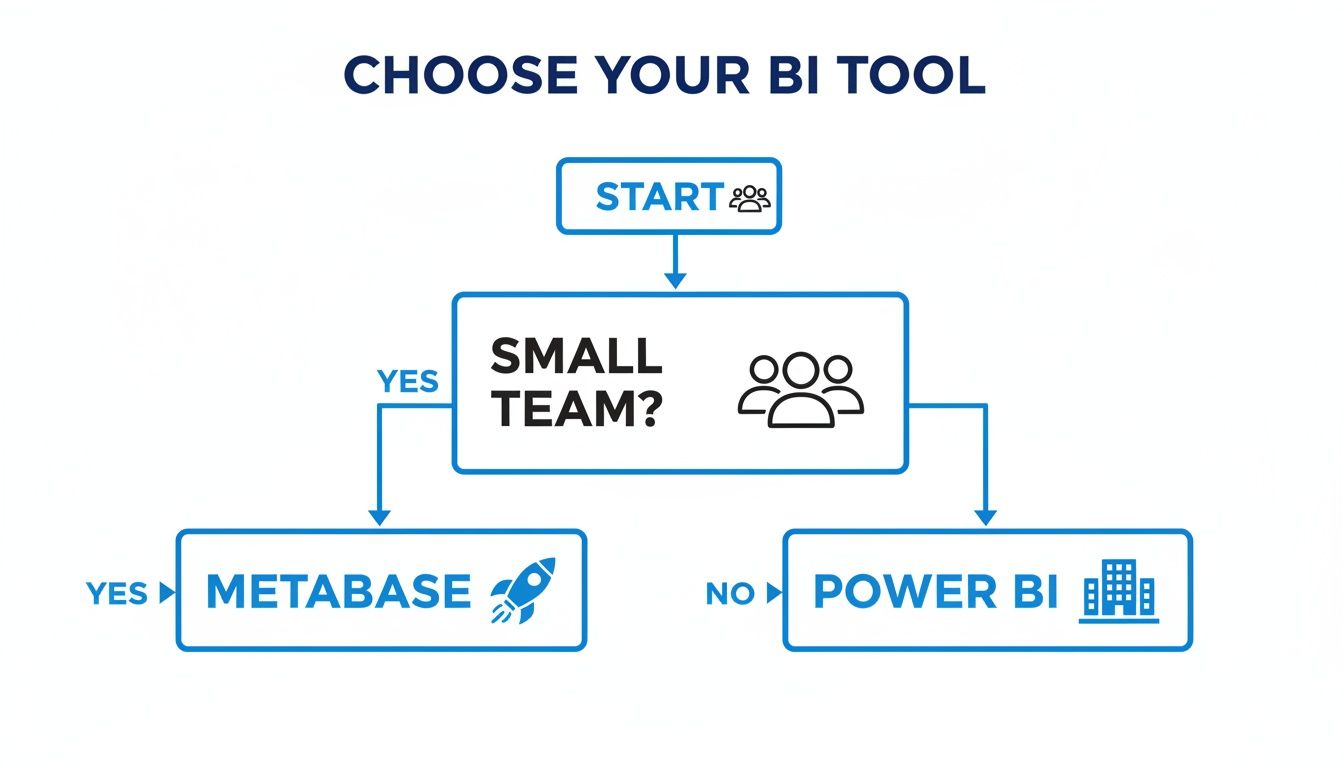
Flowchart guiding the choice of a BI tool: Metabase for small teams, Power BI for larger teams.

When to Choose Metabase

Go with Metabase if you're a startup where agility is everything. If your product managers and marketers need to grab data on their own without filing a ticket, Metabase is built for them. It shines when the cost of not knowing something is far greater than the cost of the tool itself.

When to Choose Power BI

Opt for Power BI if you're a large enterprise already committed to the Microsoft stack. When you have a dedicated BI team, strict data governance policies, and complex data sources, you need its industrial-strength capabilities. Security, roles, and governance aren't just features; they're mission-critical.

What If Neither Feels Quite Right? The Third Way

Caught in the middle? Maybe you need more analytical muscle than Metabase offers but want to avoid the sheer complexity of Power BI. Your problem might not be the BI tool itself, but the time it takes to get from a question to an insight.

This is exactly where a Conversational AI Data Analyst like Statspresso flips the script. You just ask a question in plain English and get a chart back.

  • Try asking Statspresso: "What was our top-selling product category in Q4, and how did it compare to Q3?"

The answer appears in seconds. No dashboard to build, no query to write.

Beyond Dashboards: Just Ask a Question

So far, we've treated the choice between Metabase and Power BI as if you have to pick one side. But what if that entire debate misses the point?

The classic BI dilemma is this: the simple tool isn't powerful enough, and the powerful tool isn't simple enough.

A man holding a phone with data charts, symbolizing data analysis and business insights.

This is where a completely different approach, known as Conversational Analytics, changes the game. If you're new to this idea, it’s worth reading up on What is Conversational AI.

Statspresso, a Conversational AI Data Analyst, is built to deliver the speed of a simple query and the depth of a complex analysis. You skip the SQL. Just ask your data a question and get a chart in seconds.

The Old Way (Manual BI) vs The New Way (Statspresso)

Let's make this real. Here’s a look at how tedious manual analysis stacks up against asking an AI assistant.

Task

Old Way (Manual SQL)

New Way (Statspresso)

Get a Chart

Log in, find the right dashboard, apply filters, and hope the data is what you need.

Ask: "Show me our monthly revenue for the last year."

Ask Follow-ups

Go back to the query editor, add a new dimension, and wait for it to run again.

Ask: "Cool, now break that down by product line."

Share Insights

Take a screenshot, paste it into Slack, and type out an explanation for your team.

Click a button to share the interactive chart or add it to a shared dashboard.

This isn't just about saving a few minutes. It's about collapsing the time between a moment of curiosity and a moment of clarity. This new category of tool, sometimes called "GenBI," is a major trend for 2026 as businesses look for faster answers.

  • Try asking Statspresso: "Compare our user signups from last month to this month by acquisition channel."

Getting an answer instantly turns what was once a 30-minute task into a 3-second conversation.

Frequently Asked Questions

Let's dig into the common sticking points that always come up in the Metabase vs. Power BI debate.

Can Metabase Handle Large Datasets Like Power BI?

Metabase queries your database directly. So, the better question is: can your database handle the queries? If you connect Metabase to a powerhouse data warehouse like Snowflake or BigQuery, it will fly. Power BI, on the other hand, ingests data into its own high-performance engine. Metabase's speed reflects your database's power; Power BI's performance hinges on its internal engine.

How Long Does It Take to Learn Power BI for a Beginner?

Be direct: the learning curve for Power BI is steep. To build solid data models with Power Query and write meaningful DAX calculations, budget several weeks of serious, dedicated learning. It's not something you pick up over a weekend.

How Does Each Tool Handle Embedding Analytics?

Both have strong embedding capabilities, but for different use cases.

  • Metabase is a favorite for SaaS companies that want to offer customer-facing analytics. It's affordable and much simpler to implement. They have a great post about simplifying embedding.

  • Power BI provides incredibly secure embedding for enterprise-level applications. The licensing for external users is complex and can get very expensive, making it overkill for a startup’s budget.

How Does Statspresso Connect to My Data?

Connecting your data to Statspresso is a quick, three-step process:

  1. Pick your data source (like Postgres, Shopify, or HubSpot).

  2. Enter your credentials in a secure form.

  3. Start asking questions in plain English.

That's it. Statspresso acts as a Conversational AI Data Analyst that securely queries your database directly. You just ask, and you get a chart in seconds.

Tired of building reports and ready to get answers? Connect your first data source for free and ask your first question at https://www.statspresso.com.

Picking between Metabase vs Power BI often feels like choosing between a sports car and a freight train. Both get you somewhere, but they’re built for entirely different journeys.

Waiting weeks for a data analyst to build a dashboard is a relic of the past. The real problem for most businesses isn't a lack of data; it's the friction caused by clunky BI tools. Your choice hinges on your team's expertise, your budget, and how you define "fast" when it comes to getting insights. Let's find the right tool for you.

Two data analytics scenes: a smiling man with a Metabase laptop, and another man reviewing Power BI server data.

A Quick TL;DR (Too Long; Didn't Read)

  • Choose Metabase if: You're a startup or SMB valuing speed. Your non-technical team needs to answer its own data questions without learning SQL. It’s fast, intuitive, and often free.

  • Choose Power BI if: You're a large enterprise deep in the Microsoft ecosystem. You have a dedicated BI team ready to tackle its steep learning curve for deep data governance.

  • Choose Statspresso if: You want to skip the learning curve entirely. As a Conversational AI Data Analyst, it lets you ask questions in plain English and get charts in seconds. Skip the SQL. Just ask your data a question and get a chart in seconds.

Metabase vs Power BI at a Glance

This table breaks down the core differences to help you see where each tool shines.

Criterion

Metabase

Power BI

Best For

Startups, SMBs, and non-technical teams needing quick insights.

Enterprises and data professionals requiring deep data modeling.

Ease of Use

Extremely high. Intuitive point-and-click and question builder.

Steep learning curve. Requires proficiency in DAX and Power Query.

Setup Time

Minutes. Can be deployed and providing value in under an hour.

Days to weeks. Involves complex configuration and data modeling.

Core Strength

Democratizing data with self-service analytics that are fast and simple.

Robust data governance, complex data modeling, and enterprise security.

Pricing Model

Generous open-source version and affordable paid plans.

Complex, multi-tiered licensing that can become expensive at scale.

Ultimately, your decision comes down to a single question: are you trying to build a centralized team of data specialists, or empower everyone to find their own answers? Your answer points directly to the right tool.

And for teams looking for an even faster path to insight, there's always the third way. Imagine just asking your data a question.

  • Try asking Statspresso: "Show me our monthly recurring revenue growth over the last 6 months, broken down by plan."

That's the promise of a Conversational AI Data Analyst.

What Is Metabase? The Startup Favorite

Metabase is a hit with lean teams for one simple reason: it believes getting answers from your data shouldn't require a data expert. It’s built for the founder or product manager who has valuable questions but no time to learn SQL.

The entire tool is designed around an intuitive query builder. This lets anyone on your team point, click, and explore data on their own, making it a favorite for organizations that value speed and self-service analytics above all else.

Three happy colleagues collaborating and analyzing data visualizations on a laptop screen with colorful watercolor splashes.

Designed for Speed and Simplicity

Metabase's real appeal is its lightning-fast setup. While a full Power BI implementation can take weeks, you can have Metabase running in minutes. This isn’t just about the initial install; it's about the day-to-day workflow. A product manager can immediately dig into user behavior without filing a ticket and waiting for an analyst.

Metabase is built on the belief that the person with the question should be the one to get the answer. It removes the technical gatekeeper.

This focus on simplicity has made it a darling of tech companies. According to a 2026 industry report on BI adoption, startups prefer tools with a free, self-hosted option like Metabase by a 3-to-1 margin. Its intuitive approach often leads to 80% faster setup times compared to legacy enterprise tools. You can see a deeper dive into Metabase vs Power BI on their site.

Who Is Metabase Built For?

Metabase shines when it's in the hands of people who need answers without the friction. It’s the perfect fit for:

  • Product Managers who need to track feature adoption and user funnels.

  • Marketing Leads analyzing campaign performance.

  • Founders who want a quick pulse on key metrics like MRR or user growth.

If your team uses common SQL databases like Postgres or MySQL and needs to move quickly, Metabase is practically built for you. Of course, this simplicity comes with a trade-off. It isn't designed for the sprawling data ecosystems of a Fortune 500 company. In the Metabase vs Power BI comparison, Metabase clearly bets on agility over exhaustive features.

What Is Power BI? The Enterprise Powerhouse

If Metabase is built for quick, democratized data access, then Microsoft Power BI is the other end of the spectrum. Think of it as the standard for large-scale, governed business intelligence.

This isn't just a tool for making charts; it's a comprehensive platform for building an organization's entire data culture. Its true strength is its incredibly powerful data modeling engine. Using DAX (Data Analysis Expressions) and Power Query, analysts can construct a robust, centralized data model that acts as the single source of truth for the business.

The Analyst's Swiss Army Knife

Power BI is tailor-made for dedicated BI teams who need to pull data from dozens of sources and weave it into a cohesive narrative. It’s what an analyst uses to build a certified sales pipeline model that the entire C-suite can trust. For a deeper look, many find it helpful to explore the full scope of Business Intelligence Power BI.

Its prevalence in the corporate world is hard to overstate. It’s a key analytics engine for a majority of Fortune 500 companies. A big reason is its massive library of over 100 connectors, which link to everything from enterprise databases to niche SaaS apps. You can read more about these impressive Power BI capabilities to understand its enterprise reach.

Power Comes at a Price

But here's the catch: all that capability comes with a cost. The learning curve is notoriously steep, and the total cost of ownership can be high once you factor in the need for specialized expertise.

Power BI is incredibly capable, but it demands respect—and training. For teams without a dedicated analyst, it can quickly become expensive, underused shelfware.

To truly unlock Power BI, your team needs to be comfortable with its proprietary languages. This complexity can inadvertently create the very bottleneck you're trying to solve. This brings the Metabase vs Power BI debate into sharp focus. Are you trying to build a professional, highly governed data practice, or enable fast, self-serve exploration? Power BI is firmly in the first camp.

A Head-to-Head Feature Comparison

Let's get into the weeds. When you're picking a BI tool, the day-to-day feature differences are what will make or break your team's success. This is where the trade-offs between Metabase and Power BI become crystal clear.

Data Connectivity: The First Hurdle

Your BI tool is useless if it can't talk to your data.

Metabase plays to its strengths as a front-end for your modern data stack. It offers around 20+ official connectors, focusing on databases that power most tech companies: Postgres, MySQL, BigQuery, Snowflake, and the like. The setup is refreshingly simple.

Power BI, on the other hand, is an integration machine. It has over 100 native connectors, spanning everything from standard SQL databases to massive enterprise systems like SAP and Salesforce. For a large organization with a tangled web of data sources, this breadth is non-negotiable.

Querying and Data Modeling: The Engine Room

This is where the two tools diverge most dramatically.

The Metabase Approach: Point-and-Click for Everyone

Metabase's mission is to get data into everyone's hands. Its crown jewel is the intuitive query builder, which lets a non-technical user answer their own questions without writing a single line of code. It's incredibly empowering. For analysts, there's a clean SQL editor. Its data modeling is intentionally light; it’s for getting answers, fast.

The Power BI Approach: The Power of DAX and Power Query

Power BI prioritizes power over approachability. Its strength lies in two core components:

  • Power Query: A full-blown data transformation engine that allows analysts to clean, reshape, and merge data from various sources.

  • DAX (Data Analysis Expressions): A proprietary formula language for building sophisticated business logic not possible with standard SQL.

Let's be clear: learning DAX is a serious commitment. This is why Power BI is a tool for data professionals. It’s built for a world where analysts create governed, certified data models that the rest of the business consumes.

Visualization and Cost

Metabase provides a curated palette of essential, clean visualizations. The options are deliberately limited to guide users toward clarity. Its pricing is just as simple, with a generous free, open-source version and affordable paid plans.

Power BI is a graphic designer's playground with a massive library of visuals and endless customization. Its pricing is more complex. The low entry price for a "Pro" license hides the true cost, which can escalate into thousands of dollars per month for "Premium" capacity needed at scale.

For a broader look at your options, check out our business intelligence software comparison guide.

Making the Right Choice for Your Team

Picking between Metabase and Power BI isn't about which tool has more features. It's about finding the right fit for your team's culture, skills, and budget.

Flowchart guiding the choice of a BI tool: Metabase for small teams, Power BI for larger teams.

When to Choose Metabase

Go with Metabase if you're a startup where agility is everything. If your product managers and marketers need to grab data on their own without filing a ticket, Metabase is built for them. It shines when the cost of not knowing something is far greater than the cost of the tool itself.

When to Choose Power BI

Opt for Power BI if you're a large enterprise already committed to the Microsoft stack. When you have a dedicated BI team, strict data governance policies, and complex data sources, you need its industrial-strength capabilities. Security, roles, and governance aren't just features; they're mission-critical.

What If Neither Feels Quite Right? The Third Way

Caught in the middle? Maybe you need more analytical muscle than Metabase offers but want to avoid the sheer complexity of Power BI. Your problem might not be the BI tool itself, but the time it takes to get from a question to an insight.

This is exactly where a Conversational AI Data Analyst like Statspresso flips the script. You just ask a question in plain English and get a chart back.

  • Try asking Statspresso: "What was our top-selling product category in Q4, and how did it compare to Q3?"

The answer appears in seconds. No dashboard to build, no query to write.

Beyond Dashboards: Just Ask a Question

So far, we've treated the choice between Metabase and Power BI as if you have to pick one side. But what if that entire debate misses the point?

The classic BI dilemma is this: the simple tool isn't powerful enough, and the powerful tool isn't simple enough.

A man holding a phone with data charts, symbolizing data analysis and business insights.

This is where a completely different approach, known as Conversational Analytics, changes the game. If you're new to this idea, it’s worth reading up on What is Conversational AI.

Statspresso, a Conversational AI Data Analyst, is built to deliver the speed of a simple query and the depth of a complex analysis. You skip the SQL. Just ask your data a question and get a chart in seconds.

The Old Way (Manual BI) vs The New Way (Statspresso)

Let's make this real. Here’s a look at how tedious manual analysis stacks up against asking an AI assistant.

Task

Old Way (Manual SQL)

New Way (Statspresso)

Get a Chart

Log in, find the right dashboard, apply filters, and hope the data is what you need.

Ask: "Show me our monthly revenue for the last year."

Ask Follow-ups

Go back to the query editor, add a new dimension, and wait for it to run again.

Ask: "Cool, now break that down by product line."

Share Insights

Take a screenshot, paste it into Slack, and type out an explanation for your team.

Click a button to share the interactive chart or add it to a shared dashboard.

This isn't just about saving a few minutes. It's about collapsing the time between a moment of curiosity and a moment of clarity. This new category of tool, sometimes called "GenBI," is a major trend for 2026 as businesses look for faster answers.

  • Try asking Statspresso: "Compare our user signups from last month to this month by acquisition channel."

Getting an answer instantly turns what was once a 30-minute task into a 3-second conversation.

Frequently Asked Questions

Let's dig into the common sticking points that always come up in the Metabase vs. Power BI debate.

Can Metabase Handle Large Datasets Like Power BI?

Metabase queries your database directly. So, the better question is: can your database handle the queries? If you connect Metabase to a powerhouse data warehouse like Snowflake or BigQuery, it will fly. Power BI, on the other hand, ingests data into its own high-performance engine. Metabase's speed reflects your database's power; Power BI's performance hinges on its internal engine.

How Long Does It Take to Learn Power BI for a Beginner?

Be direct: the learning curve for Power BI is steep. To build solid data models with Power Query and write meaningful DAX calculations, budget several weeks of serious, dedicated learning. It's not something you pick up over a weekend.

How Does Each Tool Handle Embedding Analytics?

Both have strong embedding capabilities, but for different use cases.

  • Metabase is a favorite for SaaS companies that want to offer customer-facing analytics. It's affordable and much simpler to implement. They have a great post about simplifying embedding.

  • Power BI provides incredibly secure embedding for enterprise-level applications. The licensing for external users is complex and can get very expensive, making it overkill for a startup’s budget.

How Does Statspresso Connect to My Data?

Connecting your data to Statspresso is a quick, three-step process:

  1. Pick your data source (like Postgres, Shopify, or HubSpot).

  2. Enter your credentials in a secure form.

  3. Start asking questions in plain English.

That's it. Statspresso acts as a Conversational AI Data Analyst that securely queries your database directly. You just ask, and you get a chart in seconds.

Tired of building reports and ready to get answers? Connect your first data source for free and ask your first question at https://www.statspresso.com.

Picking between Metabase vs Power BI often feels like choosing between a sports car and a freight train. Both get you somewhere, but they’re built for entirely different journeys.

Waiting weeks for a data analyst to build a dashboard is a relic of the past. The real problem for most businesses isn't a lack of data; it's the friction caused by clunky BI tools. Your choice hinges on your team's expertise, your budget, and how you define "fast" when it comes to getting insights. Let's find the right tool for you.

Two data analytics scenes: a smiling man with a Metabase laptop, and another man reviewing Power BI server data.

A Quick TL;DR (Too Long; Didn't Read)

  • Choose Metabase if: You're a startup or SMB valuing speed. Your non-technical team needs to answer its own data questions without learning SQL. It’s fast, intuitive, and often free.

  • Choose Power BI if: You're a large enterprise deep in the Microsoft ecosystem. You have a dedicated BI team ready to tackle its steep learning curve for deep data governance.

  • Choose Statspresso if: You want to skip the learning curve entirely. As a Conversational AI Data Analyst, it lets you ask questions in plain English and get charts in seconds. Skip the SQL. Just ask your data a question and get a chart in seconds.

Metabase vs Power BI at a Glance

This table breaks down the core differences to help you see where each tool shines.

Criterion

Metabase

Power BI

Best For

Startups, SMBs, and non-technical teams needing quick insights.

Enterprises and data professionals requiring deep data modeling.

Ease of Use

Extremely high. Intuitive point-and-click and question builder.

Steep learning curve. Requires proficiency in DAX and Power Query.

Setup Time

Minutes. Can be deployed and providing value in under an hour.

Days to weeks. Involves complex configuration and data modeling.

Core Strength

Democratizing data with self-service analytics that are fast and simple.

Robust data governance, complex data modeling, and enterprise security.

Pricing Model

Generous open-source version and affordable paid plans.

Complex, multi-tiered licensing that can become expensive at scale.

Ultimately, your decision comes down to a single question: are you trying to build a centralized team of data specialists, or empower everyone to find their own answers? Your answer points directly to the right tool.

And for teams looking for an even faster path to insight, there's always the third way. Imagine just asking your data a question.

  • Try asking Statspresso: "Show me our monthly recurring revenue growth over the last 6 months, broken down by plan."

That's the promise of a Conversational AI Data Analyst.

What Is Metabase? The Startup Favorite

Metabase is a hit with lean teams for one simple reason: it believes getting answers from your data shouldn't require a data expert. It’s built for the founder or product manager who has valuable questions but no time to learn SQL.

The entire tool is designed around an intuitive query builder. This lets anyone on your team point, click, and explore data on their own, making it a favorite for organizations that value speed and self-service analytics above all else.

Three happy colleagues collaborating and analyzing data visualizations on a laptop screen with colorful watercolor splashes.

Designed for Speed and Simplicity

Metabase's real appeal is its lightning-fast setup. While a full Power BI implementation can take weeks, you can have Metabase running in minutes. This isn’t just about the initial install; it's about the day-to-day workflow. A product manager can immediately dig into user behavior without filing a ticket and waiting for an analyst.

Metabase is built on the belief that the person with the question should be the one to get the answer. It removes the technical gatekeeper.

This focus on simplicity has made it a darling of tech companies. According to a 2026 industry report on BI adoption, startups prefer tools with a free, self-hosted option like Metabase by a 3-to-1 margin. Its intuitive approach often leads to 80% faster setup times compared to legacy enterprise tools. You can see a deeper dive into Metabase vs Power BI on their site.

Who Is Metabase Built For?

Metabase shines when it's in the hands of people who need answers without the friction. It’s the perfect fit for:

  • Product Managers who need to track feature adoption and user funnels.

  • Marketing Leads analyzing campaign performance.

  • Founders who want a quick pulse on key metrics like MRR or user growth.

If your team uses common SQL databases like Postgres or MySQL and needs to move quickly, Metabase is practically built for you. Of course, this simplicity comes with a trade-off. It isn't designed for the sprawling data ecosystems of a Fortune 500 company. In the Metabase vs Power BI comparison, Metabase clearly bets on agility over exhaustive features.

What Is Power BI? The Enterprise Powerhouse

If Metabase is built for quick, democratized data access, then Microsoft Power BI is the other end of the spectrum. Think of it as the standard for large-scale, governed business intelligence.

This isn't just a tool for making charts; it's a comprehensive platform for building an organization's entire data culture. Its true strength is its incredibly powerful data modeling engine. Using DAX (Data Analysis Expressions) and Power Query, analysts can construct a robust, centralized data model that acts as the single source of truth for the business.

The Analyst's Swiss Army Knife

Power BI is tailor-made for dedicated BI teams who need to pull data from dozens of sources and weave it into a cohesive narrative. It’s what an analyst uses to build a certified sales pipeline model that the entire C-suite can trust. For a deeper look, many find it helpful to explore the full scope of Business Intelligence Power BI.

Its prevalence in the corporate world is hard to overstate. It’s a key analytics engine for a majority of Fortune 500 companies. A big reason is its massive library of over 100 connectors, which link to everything from enterprise databases to niche SaaS apps. You can read more about these impressive Power BI capabilities to understand its enterprise reach.

Power Comes at a Price

But here's the catch: all that capability comes with a cost. The learning curve is notoriously steep, and the total cost of ownership can be high once you factor in the need for specialized expertise.

Power BI is incredibly capable, but it demands respect—and training. For teams without a dedicated analyst, it can quickly become expensive, underused shelfware.

To truly unlock Power BI, your team needs to be comfortable with its proprietary languages. This complexity can inadvertently create the very bottleneck you're trying to solve. This brings the Metabase vs Power BI debate into sharp focus. Are you trying to build a professional, highly governed data practice, or enable fast, self-serve exploration? Power BI is firmly in the first camp.

A Head-to-Head Feature Comparison

Let's get into the weeds. When you're picking a BI tool, the day-to-day feature differences are what will make or break your team's success. This is where the trade-offs between Metabase and Power BI become crystal clear.

Data Connectivity: The First Hurdle

Your BI tool is useless if it can't talk to your data.

Metabase plays to its strengths as a front-end for your modern data stack. It offers around 20+ official connectors, focusing on databases that power most tech companies: Postgres, MySQL, BigQuery, Snowflake, and the like. The setup is refreshingly simple.

Power BI, on the other hand, is an integration machine. It has over 100 native connectors, spanning everything from standard SQL databases to massive enterprise systems like SAP and Salesforce. For a large organization with a tangled web of data sources, this breadth is non-negotiable.

Querying and Data Modeling: The Engine Room

This is where the two tools diverge most dramatically.

The Metabase Approach: Point-and-Click for Everyone

Metabase's mission is to get data into everyone's hands. Its crown jewel is the intuitive query builder, which lets a non-technical user answer their own questions without writing a single line of code. It's incredibly empowering. For analysts, there's a clean SQL editor. Its data modeling is intentionally light; it’s for getting answers, fast.

The Power BI Approach: The Power of DAX and Power Query

Power BI prioritizes power over approachability. Its strength lies in two core components:

  • Power Query: A full-blown data transformation engine that allows analysts to clean, reshape, and merge data from various sources.

  • DAX (Data Analysis Expressions): A proprietary formula language for building sophisticated business logic not possible with standard SQL.

Let's be clear: learning DAX is a serious commitment. This is why Power BI is a tool for data professionals. It’s built for a world where analysts create governed, certified data models that the rest of the business consumes.

Visualization and Cost

Metabase provides a curated palette of essential, clean visualizations. The options are deliberately limited to guide users toward clarity. Its pricing is just as simple, with a generous free, open-source version and affordable paid plans.

Power BI is a graphic designer's playground with a massive library of visuals and endless customization. Its pricing is more complex. The low entry price for a "Pro" license hides the true cost, which can escalate into thousands of dollars per month for "Premium" capacity needed at scale.

For a broader look at your options, check out our business intelligence software comparison guide.

Making the Right Choice for Your Team

Picking between Metabase and Power BI isn't about which tool has more features. It's about finding the right fit for your team's culture, skills, and budget.

Flowchart guiding the choice of a BI tool: Metabase for small teams, Power BI for larger teams.

When to Choose Metabase

Go with Metabase if you're a startup where agility is everything. If your product managers and marketers need to grab data on their own without filing a ticket, Metabase is built for them. It shines when the cost of not knowing something is far greater than the cost of the tool itself.

When to Choose Power BI

Opt for Power BI if you're a large enterprise already committed to the Microsoft stack. When you have a dedicated BI team, strict data governance policies, and complex data sources, you need its industrial-strength capabilities. Security, roles, and governance aren't just features; they're mission-critical.

What If Neither Feels Quite Right? The Third Way

Caught in the middle? Maybe you need more analytical muscle than Metabase offers but want to avoid the sheer complexity of Power BI. Your problem might not be the BI tool itself, but the time it takes to get from a question to an insight.

This is exactly where a Conversational AI Data Analyst like Statspresso flips the script. You just ask a question in plain English and get a chart back.

  • Try asking Statspresso: "What was our top-selling product category in Q4, and how did it compare to Q3?"

The answer appears in seconds. No dashboard to build, no query to write.

Beyond Dashboards: Just Ask a Question

So far, we've treated the choice between Metabase and Power BI as if you have to pick one side. But what if that entire debate misses the point?

The classic BI dilemma is this: the simple tool isn't powerful enough, and the powerful tool isn't simple enough.

A man holding a phone with data charts, symbolizing data analysis and business insights.

This is where a completely different approach, known as Conversational Analytics, changes the game. If you're new to this idea, it’s worth reading up on What is Conversational AI.

Statspresso, a Conversational AI Data Analyst, is built to deliver the speed of a simple query and the depth of a complex analysis. You skip the SQL. Just ask your data a question and get a chart in seconds.

The Old Way (Manual BI) vs The New Way (Statspresso)

Let's make this real. Here’s a look at how tedious manual analysis stacks up against asking an AI assistant.

Task

Old Way (Manual SQL)

New Way (Statspresso)

Get a Chart

Log in, find the right dashboard, apply filters, and hope the data is what you need.

Ask: "Show me our monthly revenue for the last year."

Ask Follow-ups

Go back to the query editor, add a new dimension, and wait for it to run again.

Ask: "Cool, now break that down by product line."

Share Insights

Take a screenshot, paste it into Slack, and type out an explanation for your team.

Click a button to share the interactive chart or add it to a shared dashboard.

This isn't just about saving a few minutes. It's about collapsing the time between a moment of curiosity and a moment of clarity. This new category of tool, sometimes called "GenBI," is a major trend for 2026 as businesses look for faster answers.

  • Try asking Statspresso: "Compare our user signups from last month to this month by acquisition channel."

Getting an answer instantly turns what was once a 30-minute task into a 3-second conversation.

Frequently Asked Questions

Let's dig into the common sticking points that always come up in the Metabase vs. Power BI debate.

Can Metabase Handle Large Datasets Like Power BI?

Metabase queries your database directly. So, the better question is: can your database handle the queries? If you connect Metabase to a powerhouse data warehouse like Snowflake or BigQuery, it will fly. Power BI, on the other hand, ingests data into its own high-performance engine. Metabase's speed reflects your database's power; Power BI's performance hinges on its internal engine.

How Long Does It Take to Learn Power BI for a Beginner?

Be direct: the learning curve for Power BI is steep. To build solid data models with Power Query and write meaningful DAX calculations, budget several weeks of serious, dedicated learning. It's not something you pick up over a weekend.

How Does Each Tool Handle Embedding Analytics?

Both have strong embedding capabilities, but for different use cases.

  • Metabase is a favorite for SaaS companies that want to offer customer-facing analytics. It's affordable and much simpler to implement. They have a great post about simplifying embedding.

  • Power BI provides incredibly secure embedding for enterprise-level applications. The licensing for external users is complex and can get very expensive, making it overkill for a startup’s budget.

How Does Statspresso Connect to My Data?

Connecting your data to Statspresso is a quick, three-step process:

  1. Pick your data source (like Postgres, Shopify, or HubSpot).

  2. Enter your credentials in a secure form.

  3. Start asking questions in plain English.

That's it. Statspresso acts as a Conversational AI Data Analyst that securely queries your database directly. You just ask, and you get a chart in seconds.

Tired of building reports and ready to get answers? Connect your first data source for free and ask your first question at https://www.statspresso.com.