The Ultimate Guide to Spreadsheet Automation in 2026

Waiting weeks for a data analyst to build a dashboard is a relic of the past. Yet, you're still stuck in a productivity trap, spending hours every week copying, pasting, and wrangling data. Spreadsheet automation is your way out. It’s about using smart tools and simple scripts to take over mind-numbing tasks, so you can focus on work that actually matters. This guide is for busy founders, product managers, and marketing leads who have data but no time to learn SQL or Tableau.
Key Takeaways (TL;DR)
The Problem: Manual spreadsheet work is a productivity killer. It's slow, error-prone, and doesn't scale. A 2026 industry report shows analysts still waste over six hours a week on these tasks.
The Old Way vs. New Way: Traditional automation uses scripts for repetitive tasks (like weekly reports). The new way uses a Conversational AI Data Analyst like Statspresso to get instant answers to ad-hoc questions.
Start with No-Code: Use built-in tools like Excel's Power Query or Google Sheets' macro recorder to automate data cleaning without writing a single line of code.
Know When to Stop: When questions become dynamic and unpredictable, stop building rigid scripts. It's time to have a conversation with your data instead.
The Big Win: The goal isn't just to automate reports; it's to free up your team for strategic thinking. Skip the SQL. Just ask your data a question and get a chart in seconds.
Why Your Spreadsheets Are Secretly Costing You a Fortune
Remember when you had to wait weeks for a data analyst to pull a report? Those days are gone, yet many of us are still chained to our spreadsheets, manually exporting the same sales data or cleaning the same lead lists. It’s a silent killer of productivity.

This manual grind isn't just tedious; it's expensive. Every hour you spend on menial data prep is an hour you're not spending on strategy, talking to customers, or growing the business. This guide is for founders, marketers, and product managers drowning in data without the time to become coding experts.
The Hidden "Spreadsheet Tax" You're Paying
You're not alone. I see this struggle constantly. According to industry research projections for 2026, a staggering 76% of analysts still use spreadsheets for most data prep. Almost half of them spend over six hours a week on these manual tasks. You can dig into the full analysis over on Alteryx.com.
This "spreadsheet tax" adds up quickly.
Tiny Errors, Massive Headaches: A simple copy-paste mistake can corrupt your entire dataset, leading to flawed insights and bad decisions.
The Scalability Cliff: The manual process for 100 rows falls apart at 10,000. Your growth shouldn't break your workflow.
Insights Arriving Too Late: By the time you’ve manually prepped the data, the window of opportunity has often closed.
Let's look at the real-world impact.
The True Cost: Manual vs. Automated
Old Way (Manual Spreadsheet Tasks) | New Way (Automated Workflows) |
|---|---|
Hours per week spent on copy-pasting, cleaning, and formatting. | Minutes per week as scripts and tools run tasks automatically. |
High risk of human error from typos and formula mistakes. | Consistent, error-free data processing every single time. |
Data is often hours or days old by the time it's usable. | Insights are available in real-time or on-demand. |
Impossible to scale without hiring more people to do more manual work. | Effortlessly scales from hundreds to millions of rows. |
Team members are bogged down in low-value, repetitive tasks. | Team members are freed up for strategic analysis and decision-making. |
The difference is night and day. But what if you could go further? Instead of just automating the reports, what if you could automate getting the answers?
That's the idea behind a Conversational AI Data Analyst like Statspresso. You connect your data, skip the formulas, and simply ask questions.
Try asking Statspresso: "Show me my revenue by month for the last year as a bar chart."
You get the chart in seconds. This guide will walk you through your first steps in spreadsheet automation, but more importantly, it will help you recognize when it’s time to stop building and start asking.
How to Find Your Best Automation Opportunities
Before you think about writing a script, you have to know where to aim. The point of spreadsheet automation is to win back your time, not to pick up a frustrating new coding hobby. So, where’s the best place to start?
The low-hanging fruit almost always involves tasks that are repetitive, rule-based, and high-volume.
Think about your work week. Is your Monday morning spent exporting the same three sales reports and painstakingly copy-pasting the data into a master sheet? That’s your target. The task is predictable (repetitive) and you follow the same steps every time (rule-based).
The Automation Hit List
I see the same patterns across different departments. Do any of these sound painfully familiar?
Sales Ops: Manually pulling the weekly pipeline report. This usually involves downloading a CSV from your CRM, cleaning it up, building a pivot table, and emailing it out. A perfect candidate for a quick script or a Power Query workflow.
Marketing Analytics: Pulling ad spend data from Facebook, Google, and LinkedIn into one giant spreadsheet to calculate a blended CPA. The process of downloading separate files and standardizing columns is pure drudgery that can be automated away.
Product Management: Exporting user feedback from Zendesk or Intercom and then manually categorizing tickets. If you’re just using keywords to sort them, a script can handle that in a blink.
Spreadsheet Task or AI Question?
Just because you can automate a task in a spreadsheet doesn’t mean you should. Your real goal is to get an answer, and sometimes the spreadsheet is just a clumsy detour.
Ask yourself these questions:
Is the output always the same format? If you need the exact same report every Monday at 9 AM, then spreadsheet automation is your best friend.
Is the goal to explore or discover? If you're trying to figure out why sales dipped last month, a rigid report is useless. You need to ask questions and dig deeper.
Will there be follow-up questions? An automated report is a dead end. The moment your boss asks, "How does this compare to last year?" you're back to manual work.
This is where a Conversational AI Data Analyst like Statspresso changes the game. Instead of building a script to track churn, you have a conversation with your data.
Try asking Statspresso: "What was our user churn rate last month, and which customer plan had the highest churn?"
Think of it this way: a spreadsheet is for building a predictable data factory. A conversational AI tool is for having an intelligent conversation with your data.
Getting Started with Built-In Automation Tools
You don't need to be a programmer to start your spreadsheet automation journey. Some of the most effective tools are already built into Excel and Google Sheets. The simplest place to start is by recording a macro.

It works like it sounds. You press "record," go through the motions of a repetitive task, and hit "stop." Behind the scenes, the spreadsheet writes the code for you. It's the perfect first step.
Your First Quick Win: Recording a Macro
Let's take a common scenario. Every morning, you download a raw data file. It's a mess of inconsistent date formats, extra columns, and messy headers. Sound familiar? You can automate that entire cleanup with a macro.
Find the macro recorder (in Excel, enable the "Developer" tab; in Google Sheets, find it under "Extensions"). Hit "Record Macro," name it "FormatDailyReport," and perform all the cleanup steps you normally would. When you're done, click "Stop Recording."
That’s it. Next time, run that macro with a single click. You’ve just built your first piece of spreadsheet automation.
The Real Power: Power Query and Connected Sheets
Macros are great, but for heavy-duty data prep, the real muscle is in tools like Power Query in Excel and Connected Sheets in Google. For anyone wrangling messy data from multiple sources, these tools are a revelation. They let you create a repeatable recipe for cleaning and transforming data without writing code.
For instance, I once helped a finance team that was burning hours reconciling payment files. To improve their operations, we looked into SEPA direct debit software that automates payments from spreadsheet data. The first step was cleaning their incoming data feeds—a perfect job for Power Query.
Old Way (Manual Drudgery) | New Way (Power Query Workflow) |
|---|---|
Open CSV, copy-paste into Excel. | Connect directly to the CSV file or folder. |
Manually find and delete duplicate rows. | Add a "Remove Duplicates" step. |
Use "Text to Columns" to split customer names. | Add a "Split Column by Delimiter" step. |
Repeat every single time you get a new file. | Hit "Refresh" and the entire workflow runs instantly. |
This visual process creates a clear audit trail. But even this has limits. It’s brilliant for predictable tasks. But what happens when your boss asks a question your cleaned table wasn't designed to answer? That's when you shift from processing data to exploring it. Instead of building another workflow, a Conversational AI Data Analyst like Statspresso lets you just ask.
Try asking Statspresso: "Compare sales from our top 5 products this quarter versus last quarter."
You get an instant chart without building a new report. Use built-in tools for routine cleanup, then turn to conversational AI for ad-hoc discovery.
Going Pro: Scripts and APIs for Next-Level Automation
Macros and Power Query are workhorses, but you'll eventually hit a wall. You'll need to pull data from a website or push an alert to your team. This is where scripting comes in.
Don't let that word scare you. We're not trying to become software engineers. For Excel, the tool is VBA (Visual Basic for Applications). For Google Sheets, it's Google Apps Script. These let you build spreadsheets that are truly alive.
Plugging Your Spreadsheet into the World
Imagine your spreadsheet automatically grabbing live data from other services. That's the power of scripting with APIs (Application Programming Interfaces).
For instance, instead of manually exporting a sales report from Shopify every morning, you can write a simple Google Apps Script. The script can run daily at 8 AM, connect to the Shopify API, and pull yesterday's sales directly into your sheet.
Once you have that connection, the possibilities are endless:
Live Financial Data: Build a portfolio tracker that hits a financial data API to update stock prices.
Weather-Aware Planning: An event planning sheet could pull real-time weather forecasts.
Centralized Project Dashboards: A script can fetch task updates from Jira or Trello to populate a high-level dashboard.
The data just shows up. Your static file becomes a dynamic, self-updating dashboard. Projections for 2026 show that AI-driven spreadsheet automation could increase operational efficiency by up to 30%. You can read more about these emerging AI practices in spreadsheets to see where the industry is heading.
Turning Data into Action
Automation isn't just about pulling data in; it's also about pushing actions out. Scripts can close the loop. A script could scan your sheet for "Overdue" projects and automatically send a reminder email. More advanced languages are perfect for this; for instance, you can automate tasks like sending emails with Python based on spreadsheet triggers.
But here’s the reality check. Building and maintaining custom scripts takes time. Instead of spending a week building a complex script to analyze support tickets, you could use a Conversational AI Data Analyst like Statspresso. You connect your data, then just ask.
Try asking Statspresso: "Summarize the top 5 customer complaints from our support tickets last month."
You get the answer immediately without writing a single line of code. Scripts are fantastic for routine tasks. But for the dynamic analysis that comes next, a conversational assistant is the faster path to insight.
The Breaking Point: When to Stop Automating and Start Asking
We all love a good automation script. There's a special satisfaction in building something that shaves five hours off your workload. But automation has its limits. It’s brilliant for predictable, repetitive work. The problem is, business isn't always predictable.
You can spend a week perfecting a VBA macro for a cohort analysis report. Then your CEO glances at it and says, "This is great. Now, can you show me the cohorts from our last marketing campaign?"
And just like that, your beautiful automation is useless. You’re back in the spreadsheet trenches. The automation didn't fail—the question changed, and your rigid script couldn't keep up.
Repetitive Tasks vs. Dynamic Questions
This is the critical dividing line. Are you solving a predictable data processing problem, or are you on a mission of discovery?
For predictable processing, stick with spreadsheet automation. This is for taking a known input, like a raw sales CSV, and turning it into a known output, like a cleaned-up table. The rules don't change.
For dynamic exploration, you need something more fluid. This is when you're trying to figure out why something happened. Each answer leads to another question.
This is where a Conversational AI Data Analyst like Statspresso completely changes the game. The goal shifts from "How do I build a report for this?" to "What do I need to know right now?"
Old Way vs. New Way: A Practical Comparison
Task | Spreadsheet Automation (The Old Way) | Statspresso (The New Way) |
|---|---|---|
Weekly Sales Report | Good fit. A script runs at 8 AM, cleans the data, and emails the report. | Okay fit. You could ask for it, but scheduling is what traditional automation does best. |
Exploring a Sudden Drop in Signups | Bad fit. Your report shows the drop but offers no explanation. | Perfect fit. Ask, "Compare signups last week to the week before by traffic source and device." |
Calculating Monthly Recurring Revenue (MRR) | Good fit. A formula-driven sheet can track MRR with consistent inputs. | Better fit. Instantly ask, "What is our current MRR, and what was the change from last month?" |
Answering Ad-hoc CEO Questions | Terrible fit. The classic "I'll get back to you," followed by a frantic scramble for data. | Perfect fit. Get reliable answers, live, right there in the meeting. |
Ultimately, the choice is simple. Use your spreadsheet automation skills for predictable data chores. But for the high-value work of discovery and answering urgent business questions—it's time to stop building and start asking.
Creating an Automation Workflow You Can Trust
A broken automation is worse than no automation. To avoid a mess, you have to stop thinking of spreadsheet automation as a set-it-and-forget-it magic trick. It's a living system that needs a reliable blueprint.
Adopting the right mindset makes all the difference. It’s a simple loop: define the Process you want to automate, which frees you to Ask smarter questions, and get to the Answer you were looking for.
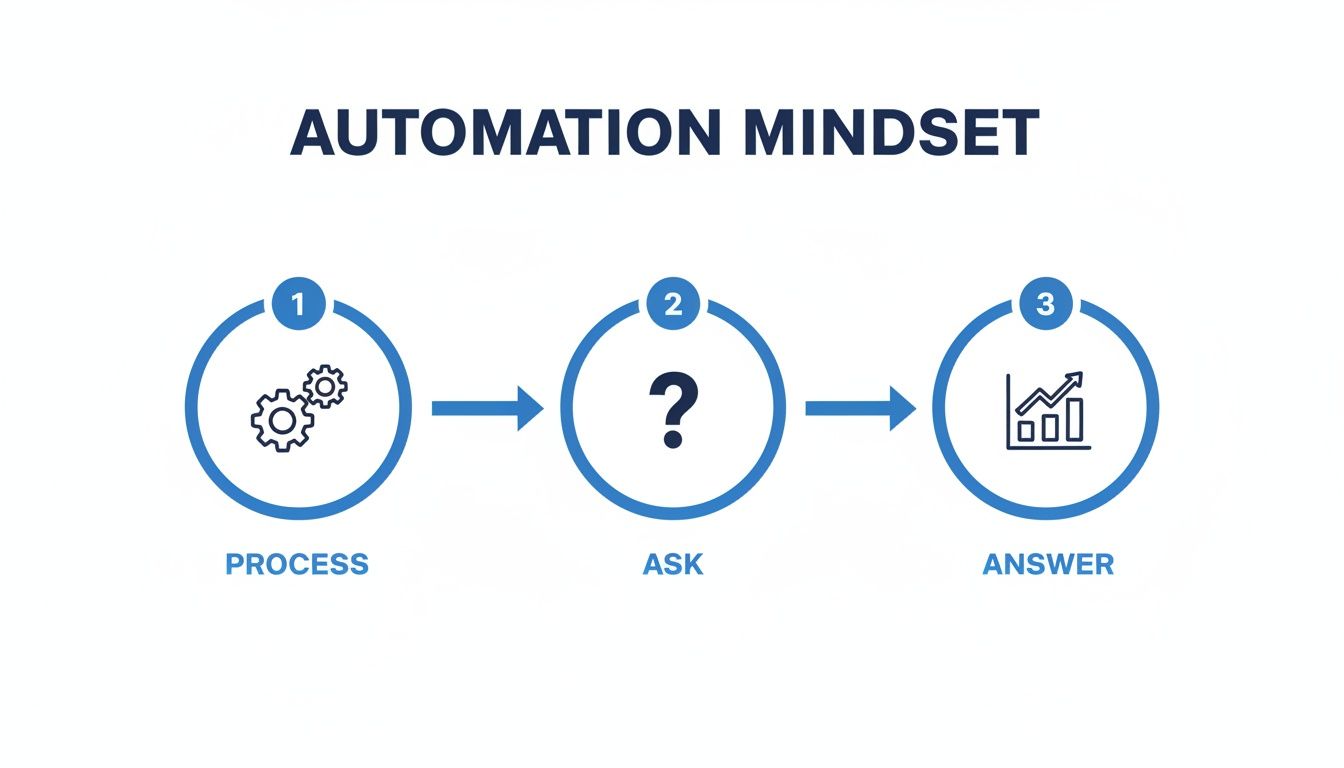
Automation isn't just about moving data. It's a bridge that connects repetitive tasks to higher-level thinking.
Scheduling and Monitoring Your Scripts
Your automations are only useful if they run without you poking them. In Google Apps Script, use time-driven triggers to schedule a script to run daily or weekly. But once it’s running, you need proof it worked. Basic logging is non-negotiable.
Log Your Successes: Have your script send a quick confirmation email or a Slack message when it finishes.
Catch Your Failures: Always wrap your code in
try...catchblocks. If something goes wrong, thecatchblock should immediately fire off an alert with the error details.Build a Status Board: For critical workflows, set up a simple "status" spreadsheet. Each time a script runs, it writes a new row with a timestamp and a "Success" or "Failure" tag.
This simple monitoring has saved me from data disasters countless times. To see how to set this up, check out our guide on how to automate your business reports. A 2026 study found that 65% of businesses using these practices cut routine task time by 30% and reduced manual errors by 75%.
For complex automations, the best move is to step away from the script entirely. Statspresso, our Conversational AI Data Analyst, gives you a built-in layer of trust. Instead of digging through code to verify a number, you just ask.
Try asking Statspresso: "What was our total revenue last week?"
You get a verifiable answer in seconds. No script-checking required.
Your Top Spreadsheet Automation Questions, Answered
I get asked about this topic all the time. Here are the most common questions.
Is it safe to automate with my company's data?
It depends on how you do it. Using built-in tools like VBA or Google Apps Script is generally safe, as your data stays within that ecosystem. The risk increases when you connect to third-party tools. For sensitive information, a platform like Statspresso is often safer. It uses direct, read-only database connections and centralizes permissions, avoiding the risks of a custom script that might accidentally expose data.
How much coding do I actually need to learn?
Honestly? You can get an incredible amount done with zero coding. Tools like Excel’s Power Query or macro recorders can handle the lion's share of repetitive data cleaning. You only need to dive into code for specific custom jobs, like pulling data from a unique API. Master the no-code tools first; you’ll be stunned by how much ground you can cover.
When have I outgrown my automated spreadsheet?
The line is clear. Spreadsheets are for routine, predictable reporting. The minute your team starts asking questions you didn't anticipate, you've hit the wall. If you're constantly tweaking a script to answer a one-off question, it's time to stop. That's your signal to look at a tool designed for exploration, like a Conversational AI Data Analyst. With Statspresso, you're not rewriting code; you're just asking a question in plain English.
Ready to skip the SQL and script-writing? Statspresso is a Conversational AI Data Analyst that gives you answers directly from your business data.
Connect your first data source for free and ask your first question.
Waiting weeks for a data analyst to build a dashboard is a relic of the past. Yet, you're still stuck in a productivity trap, spending hours every week copying, pasting, and wrangling data. Spreadsheet automation is your way out. It’s about using smart tools and simple scripts to take over mind-numbing tasks, so you can focus on work that actually matters. This guide is for busy founders, product managers, and marketing leads who have data but no time to learn SQL or Tableau.
Key Takeaways (TL;DR)
The Problem: Manual spreadsheet work is a productivity killer. It's slow, error-prone, and doesn't scale. A 2026 industry report shows analysts still waste over six hours a week on these tasks.
The Old Way vs. New Way: Traditional automation uses scripts for repetitive tasks (like weekly reports). The new way uses a Conversational AI Data Analyst like Statspresso to get instant answers to ad-hoc questions.
Start with No-Code: Use built-in tools like Excel's Power Query or Google Sheets' macro recorder to automate data cleaning without writing a single line of code.
Know When to Stop: When questions become dynamic and unpredictable, stop building rigid scripts. It's time to have a conversation with your data instead.
The Big Win: The goal isn't just to automate reports; it's to free up your team for strategic thinking. Skip the SQL. Just ask your data a question and get a chart in seconds.
Why Your Spreadsheets Are Secretly Costing You a Fortune
Remember when you had to wait weeks for a data analyst to pull a report? Those days are gone, yet many of us are still chained to our spreadsheets, manually exporting the same sales data or cleaning the same lead lists. It’s a silent killer of productivity.

This manual grind isn't just tedious; it's expensive. Every hour you spend on menial data prep is an hour you're not spending on strategy, talking to customers, or growing the business. This guide is for founders, marketers, and product managers drowning in data without the time to become coding experts.
The Hidden "Spreadsheet Tax" You're Paying
You're not alone. I see this struggle constantly. According to industry research projections for 2026, a staggering 76% of analysts still use spreadsheets for most data prep. Almost half of them spend over six hours a week on these manual tasks. You can dig into the full analysis over on Alteryx.com.
This "spreadsheet tax" adds up quickly.
Tiny Errors, Massive Headaches: A simple copy-paste mistake can corrupt your entire dataset, leading to flawed insights and bad decisions.
The Scalability Cliff: The manual process for 100 rows falls apart at 10,000. Your growth shouldn't break your workflow.
Insights Arriving Too Late: By the time you’ve manually prepped the data, the window of opportunity has often closed.
Let's look at the real-world impact.
The True Cost: Manual vs. Automated
Old Way (Manual Spreadsheet Tasks) | New Way (Automated Workflows) |
|---|---|
Hours per week spent on copy-pasting, cleaning, and formatting. | Minutes per week as scripts and tools run tasks automatically. |
High risk of human error from typos and formula mistakes. | Consistent, error-free data processing every single time. |
Data is often hours or days old by the time it's usable. | Insights are available in real-time or on-demand. |
Impossible to scale without hiring more people to do more manual work. | Effortlessly scales from hundreds to millions of rows. |
Team members are bogged down in low-value, repetitive tasks. | Team members are freed up for strategic analysis and decision-making. |
The difference is night and day. But what if you could go further? Instead of just automating the reports, what if you could automate getting the answers?
That's the idea behind a Conversational AI Data Analyst like Statspresso. You connect your data, skip the formulas, and simply ask questions.
Try asking Statspresso: "Show me my revenue by month for the last year as a bar chart."
You get the chart in seconds. This guide will walk you through your first steps in spreadsheet automation, but more importantly, it will help you recognize when it’s time to stop building and start asking.
How to Find Your Best Automation Opportunities
Before you think about writing a script, you have to know where to aim. The point of spreadsheet automation is to win back your time, not to pick up a frustrating new coding hobby. So, where’s the best place to start?
The low-hanging fruit almost always involves tasks that are repetitive, rule-based, and high-volume.
Think about your work week. Is your Monday morning spent exporting the same three sales reports and painstakingly copy-pasting the data into a master sheet? That’s your target. The task is predictable (repetitive) and you follow the same steps every time (rule-based).
The Automation Hit List
I see the same patterns across different departments. Do any of these sound painfully familiar?
Sales Ops: Manually pulling the weekly pipeline report. This usually involves downloading a CSV from your CRM, cleaning it up, building a pivot table, and emailing it out. A perfect candidate for a quick script or a Power Query workflow.
Marketing Analytics: Pulling ad spend data from Facebook, Google, and LinkedIn into one giant spreadsheet to calculate a blended CPA. The process of downloading separate files and standardizing columns is pure drudgery that can be automated away.
Product Management: Exporting user feedback from Zendesk or Intercom and then manually categorizing tickets. If you’re just using keywords to sort them, a script can handle that in a blink.
Spreadsheet Task or AI Question?
Just because you can automate a task in a spreadsheet doesn’t mean you should. Your real goal is to get an answer, and sometimes the spreadsheet is just a clumsy detour.
Ask yourself these questions:
Is the output always the same format? If you need the exact same report every Monday at 9 AM, then spreadsheet automation is your best friend.
Is the goal to explore or discover? If you're trying to figure out why sales dipped last month, a rigid report is useless. You need to ask questions and dig deeper.
Will there be follow-up questions? An automated report is a dead end. The moment your boss asks, "How does this compare to last year?" you're back to manual work.
This is where a Conversational AI Data Analyst like Statspresso changes the game. Instead of building a script to track churn, you have a conversation with your data.
Try asking Statspresso: "What was our user churn rate last month, and which customer plan had the highest churn?"
Think of it this way: a spreadsheet is for building a predictable data factory. A conversational AI tool is for having an intelligent conversation with your data.
Getting Started with Built-In Automation Tools
You don't need to be a programmer to start your spreadsheet automation journey. Some of the most effective tools are already built into Excel and Google Sheets. The simplest place to start is by recording a macro.

It works like it sounds. You press "record," go through the motions of a repetitive task, and hit "stop." Behind the scenes, the spreadsheet writes the code for you. It's the perfect first step.
Your First Quick Win: Recording a Macro
Let's take a common scenario. Every morning, you download a raw data file. It's a mess of inconsistent date formats, extra columns, and messy headers. Sound familiar? You can automate that entire cleanup with a macro.
Find the macro recorder (in Excel, enable the "Developer" tab; in Google Sheets, find it under "Extensions"). Hit "Record Macro," name it "FormatDailyReport," and perform all the cleanup steps you normally would. When you're done, click "Stop Recording."
That’s it. Next time, run that macro with a single click. You’ve just built your first piece of spreadsheet automation.
The Real Power: Power Query and Connected Sheets
Macros are great, but for heavy-duty data prep, the real muscle is in tools like Power Query in Excel and Connected Sheets in Google. For anyone wrangling messy data from multiple sources, these tools are a revelation. They let you create a repeatable recipe for cleaning and transforming data without writing code.
For instance, I once helped a finance team that was burning hours reconciling payment files. To improve their operations, we looked into SEPA direct debit software that automates payments from spreadsheet data. The first step was cleaning their incoming data feeds—a perfect job for Power Query.
Old Way (Manual Drudgery) | New Way (Power Query Workflow) |
|---|---|
Open CSV, copy-paste into Excel. | Connect directly to the CSV file or folder. |
Manually find and delete duplicate rows. | Add a "Remove Duplicates" step. |
Use "Text to Columns" to split customer names. | Add a "Split Column by Delimiter" step. |
Repeat every single time you get a new file. | Hit "Refresh" and the entire workflow runs instantly. |
This visual process creates a clear audit trail. But even this has limits. It’s brilliant for predictable tasks. But what happens when your boss asks a question your cleaned table wasn't designed to answer? That's when you shift from processing data to exploring it. Instead of building another workflow, a Conversational AI Data Analyst like Statspresso lets you just ask.
Try asking Statspresso: "Compare sales from our top 5 products this quarter versus last quarter."
You get an instant chart without building a new report. Use built-in tools for routine cleanup, then turn to conversational AI for ad-hoc discovery.
Going Pro: Scripts and APIs for Next-Level Automation
Macros and Power Query are workhorses, but you'll eventually hit a wall. You'll need to pull data from a website or push an alert to your team. This is where scripting comes in.
Don't let that word scare you. We're not trying to become software engineers. For Excel, the tool is VBA (Visual Basic for Applications). For Google Sheets, it's Google Apps Script. These let you build spreadsheets that are truly alive.
Plugging Your Spreadsheet into the World
Imagine your spreadsheet automatically grabbing live data from other services. That's the power of scripting with APIs (Application Programming Interfaces).
For instance, instead of manually exporting a sales report from Shopify every morning, you can write a simple Google Apps Script. The script can run daily at 8 AM, connect to the Shopify API, and pull yesterday's sales directly into your sheet.
Once you have that connection, the possibilities are endless:
Live Financial Data: Build a portfolio tracker that hits a financial data API to update stock prices.
Weather-Aware Planning: An event planning sheet could pull real-time weather forecasts.
Centralized Project Dashboards: A script can fetch task updates from Jira or Trello to populate a high-level dashboard.
The data just shows up. Your static file becomes a dynamic, self-updating dashboard. Projections for 2026 show that AI-driven spreadsheet automation could increase operational efficiency by up to 30%. You can read more about these emerging AI practices in spreadsheets to see where the industry is heading.
Turning Data into Action
Automation isn't just about pulling data in; it's also about pushing actions out. Scripts can close the loop. A script could scan your sheet for "Overdue" projects and automatically send a reminder email. More advanced languages are perfect for this; for instance, you can automate tasks like sending emails with Python based on spreadsheet triggers.
But here’s the reality check. Building and maintaining custom scripts takes time. Instead of spending a week building a complex script to analyze support tickets, you could use a Conversational AI Data Analyst like Statspresso. You connect your data, then just ask.
Try asking Statspresso: "Summarize the top 5 customer complaints from our support tickets last month."
You get the answer immediately without writing a single line of code. Scripts are fantastic for routine tasks. But for the dynamic analysis that comes next, a conversational assistant is the faster path to insight.
The Breaking Point: When to Stop Automating and Start Asking
We all love a good automation script. There's a special satisfaction in building something that shaves five hours off your workload. But automation has its limits. It’s brilliant for predictable, repetitive work. The problem is, business isn't always predictable.
You can spend a week perfecting a VBA macro for a cohort analysis report. Then your CEO glances at it and says, "This is great. Now, can you show me the cohorts from our last marketing campaign?"
And just like that, your beautiful automation is useless. You’re back in the spreadsheet trenches. The automation didn't fail—the question changed, and your rigid script couldn't keep up.
Repetitive Tasks vs. Dynamic Questions
This is the critical dividing line. Are you solving a predictable data processing problem, or are you on a mission of discovery?
For predictable processing, stick with spreadsheet automation. This is for taking a known input, like a raw sales CSV, and turning it into a known output, like a cleaned-up table. The rules don't change.
For dynamic exploration, you need something more fluid. This is when you're trying to figure out why something happened. Each answer leads to another question.
This is where a Conversational AI Data Analyst like Statspresso completely changes the game. The goal shifts from "How do I build a report for this?" to "What do I need to know right now?"
Old Way vs. New Way: A Practical Comparison
Task | Spreadsheet Automation (The Old Way) | Statspresso (The New Way) |
|---|---|---|
Weekly Sales Report | Good fit. A script runs at 8 AM, cleans the data, and emails the report. | Okay fit. You could ask for it, but scheduling is what traditional automation does best. |
Exploring a Sudden Drop in Signups | Bad fit. Your report shows the drop but offers no explanation. | Perfect fit. Ask, "Compare signups last week to the week before by traffic source and device." |
Calculating Monthly Recurring Revenue (MRR) | Good fit. A formula-driven sheet can track MRR with consistent inputs. | Better fit. Instantly ask, "What is our current MRR, and what was the change from last month?" |
Answering Ad-hoc CEO Questions | Terrible fit. The classic "I'll get back to you," followed by a frantic scramble for data. | Perfect fit. Get reliable answers, live, right there in the meeting. |
Ultimately, the choice is simple. Use your spreadsheet automation skills for predictable data chores. But for the high-value work of discovery and answering urgent business questions—it's time to stop building and start asking.
Creating an Automation Workflow You Can Trust
A broken automation is worse than no automation. To avoid a mess, you have to stop thinking of spreadsheet automation as a set-it-and-forget-it magic trick. It's a living system that needs a reliable blueprint.
Adopting the right mindset makes all the difference. It’s a simple loop: define the Process you want to automate, which frees you to Ask smarter questions, and get to the Answer you were looking for.

Automation isn't just about moving data. It's a bridge that connects repetitive tasks to higher-level thinking.
Scheduling and Monitoring Your Scripts
Your automations are only useful if they run without you poking them. In Google Apps Script, use time-driven triggers to schedule a script to run daily or weekly. But once it’s running, you need proof it worked. Basic logging is non-negotiable.
Log Your Successes: Have your script send a quick confirmation email or a Slack message when it finishes.
Catch Your Failures: Always wrap your code in
try...catchblocks. If something goes wrong, thecatchblock should immediately fire off an alert with the error details.Build a Status Board: For critical workflows, set up a simple "status" spreadsheet. Each time a script runs, it writes a new row with a timestamp and a "Success" or "Failure" tag.
This simple monitoring has saved me from data disasters countless times. To see how to set this up, check out our guide on how to automate your business reports. A 2026 study found that 65% of businesses using these practices cut routine task time by 30% and reduced manual errors by 75%.
For complex automations, the best move is to step away from the script entirely. Statspresso, our Conversational AI Data Analyst, gives you a built-in layer of trust. Instead of digging through code to verify a number, you just ask.
Try asking Statspresso: "What was our total revenue last week?"
You get a verifiable answer in seconds. No script-checking required.
Your Top Spreadsheet Automation Questions, Answered
I get asked about this topic all the time. Here are the most common questions.
Is it safe to automate with my company's data?
It depends on how you do it. Using built-in tools like VBA or Google Apps Script is generally safe, as your data stays within that ecosystem. The risk increases when you connect to third-party tools. For sensitive information, a platform like Statspresso is often safer. It uses direct, read-only database connections and centralizes permissions, avoiding the risks of a custom script that might accidentally expose data.
How much coding do I actually need to learn?
Honestly? You can get an incredible amount done with zero coding. Tools like Excel’s Power Query or macro recorders can handle the lion's share of repetitive data cleaning. You only need to dive into code for specific custom jobs, like pulling data from a unique API. Master the no-code tools first; you’ll be stunned by how much ground you can cover.
When have I outgrown my automated spreadsheet?
The line is clear. Spreadsheets are for routine, predictable reporting. The minute your team starts asking questions you didn't anticipate, you've hit the wall. If you're constantly tweaking a script to answer a one-off question, it's time to stop. That's your signal to look at a tool designed for exploration, like a Conversational AI Data Analyst. With Statspresso, you're not rewriting code; you're just asking a question in plain English.
Ready to skip the SQL and script-writing? Statspresso is a Conversational AI Data Analyst that gives you answers directly from your business data.
Connect your first data source for free and ask your first question.
Waiting weeks for a data analyst to build a dashboard is a relic of the past. Yet, you're still stuck in a productivity trap, spending hours every week copying, pasting, and wrangling data. Spreadsheet automation is your way out. It’s about using smart tools and simple scripts to take over mind-numbing tasks, so you can focus on work that actually matters. This guide is for busy founders, product managers, and marketing leads who have data but no time to learn SQL or Tableau.
Key Takeaways (TL;DR)
The Problem: Manual spreadsheet work is a productivity killer. It's slow, error-prone, and doesn't scale. A 2026 industry report shows analysts still waste over six hours a week on these tasks.
The Old Way vs. New Way: Traditional automation uses scripts for repetitive tasks (like weekly reports). The new way uses a Conversational AI Data Analyst like Statspresso to get instant answers to ad-hoc questions.
Start with No-Code: Use built-in tools like Excel's Power Query or Google Sheets' macro recorder to automate data cleaning without writing a single line of code.
Know When to Stop: When questions become dynamic and unpredictable, stop building rigid scripts. It's time to have a conversation with your data instead.
The Big Win: The goal isn't just to automate reports; it's to free up your team for strategic thinking. Skip the SQL. Just ask your data a question and get a chart in seconds.
Why Your Spreadsheets Are Secretly Costing You a Fortune
Remember when you had to wait weeks for a data analyst to pull a report? Those days are gone, yet many of us are still chained to our spreadsheets, manually exporting the same sales data or cleaning the same lead lists. It’s a silent killer of productivity.

This manual grind isn't just tedious; it's expensive. Every hour you spend on menial data prep is an hour you're not spending on strategy, talking to customers, or growing the business. This guide is for founders, marketers, and product managers drowning in data without the time to become coding experts.
The Hidden "Spreadsheet Tax" You're Paying
You're not alone. I see this struggle constantly. According to industry research projections for 2026, a staggering 76% of analysts still use spreadsheets for most data prep. Almost half of them spend over six hours a week on these manual tasks. You can dig into the full analysis over on Alteryx.com.
This "spreadsheet tax" adds up quickly.
Tiny Errors, Massive Headaches: A simple copy-paste mistake can corrupt your entire dataset, leading to flawed insights and bad decisions.
The Scalability Cliff: The manual process for 100 rows falls apart at 10,000. Your growth shouldn't break your workflow.
Insights Arriving Too Late: By the time you’ve manually prepped the data, the window of opportunity has often closed.
Let's look at the real-world impact.
The True Cost: Manual vs. Automated
Old Way (Manual Spreadsheet Tasks) | New Way (Automated Workflows) |
|---|---|
Hours per week spent on copy-pasting, cleaning, and formatting. | Minutes per week as scripts and tools run tasks automatically. |
High risk of human error from typos and formula mistakes. | Consistent, error-free data processing every single time. |
Data is often hours or days old by the time it's usable. | Insights are available in real-time or on-demand. |
Impossible to scale without hiring more people to do more manual work. | Effortlessly scales from hundreds to millions of rows. |
Team members are bogged down in low-value, repetitive tasks. | Team members are freed up for strategic analysis and decision-making. |
The difference is night and day. But what if you could go further? Instead of just automating the reports, what if you could automate getting the answers?
That's the idea behind a Conversational AI Data Analyst like Statspresso. You connect your data, skip the formulas, and simply ask questions.
Try asking Statspresso: "Show me my revenue by month for the last year as a bar chart."
You get the chart in seconds. This guide will walk you through your first steps in spreadsheet automation, but more importantly, it will help you recognize when it’s time to stop building and start asking.
How to Find Your Best Automation Opportunities
Before you think about writing a script, you have to know where to aim. The point of spreadsheet automation is to win back your time, not to pick up a frustrating new coding hobby. So, where’s the best place to start?
The low-hanging fruit almost always involves tasks that are repetitive, rule-based, and high-volume.
Think about your work week. Is your Monday morning spent exporting the same three sales reports and painstakingly copy-pasting the data into a master sheet? That’s your target. The task is predictable (repetitive) and you follow the same steps every time (rule-based).
The Automation Hit List
I see the same patterns across different departments. Do any of these sound painfully familiar?
Sales Ops: Manually pulling the weekly pipeline report. This usually involves downloading a CSV from your CRM, cleaning it up, building a pivot table, and emailing it out. A perfect candidate for a quick script or a Power Query workflow.
Marketing Analytics: Pulling ad spend data from Facebook, Google, and LinkedIn into one giant spreadsheet to calculate a blended CPA. The process of downloading separate files and standardizing columns is pure drudgery that can be automated away.
Product Management: Exporting user feedback from Zendesk or Intercom and then manually categorizing tickets. If you’re just using keywords to sort them, a script can handle that in a blink.
Spreadsheet Task or AI Question?
Just because you can automate a task in a spreadsheet doesn’t mean you should. Your real goal is to get an answer, and sometimes the spreadsheet is just a clumsy detour.
Ask yourself these questions:
Is the output always the same format? If you need the exact same report every Monday at 9 AM, then spreadsheet automation is your best friend.
Is the goal to explore or discover? If you're trying to figure out why sales dipped last month, a rigid report is useless. You need to ask questions and dig deeper.
Will there be follow-up questions? An automated report is a dead end. The moment your boss asks, "How does this compare to last year?" you're back to manual work.
This is where a Conversational AI Data Analyst like Statspresso changes the game. Instead of building a script to track churn, you have a conversation with your data.
Try asking Statspresso: "What was our user churn rate last month, and which customer plan had the highest churn?"
Think of it this way: a spreadsheet is for building a predictable data factory. A conversational AI tool is for having an intelligent conversation with your data.
Getting Started with Built-In Automation Tools
You don't need to be a programmer to start your spreadsheet automation journey. Some of the most effective tools are already built into Excel and Google Sheets. The simplest place to start is by recording a macro.

It works like it sounds. You press "record," go through the motions of a repetitive task, and hit "stop." Behind the scenes, the spreadsheet writes the code for you. It's the perfect first step.
Your First Quick Win: Recording a Macro
Let's take a common scenario. Every morning, you download a raw data file. It's a mess of inconsistent date formats, extra columns, and messy headers. Sound familiar? You can automate that entire cleanup with a macro.
Find the macro recorder (in Excel, enable the "Developer" tab; in Google Sheets, find it under "Extensions"). Hit "Record Macro," name it "FormatDailyReport," and perform all the cleanup steps you normally would. When you're done, click "Stop Recording."
That’s it. Next time, run that macro with a single click. You’ve just built your first piece of spreadsheet automation.
The Real Power: Power Query and Connected Sheets
Macros are great, but for heavy-duty data prep, the real muscle is in tools like Power Query in Excel and Connected Sheets in Google. For anyone wrangling messy data from multiple sources, these tools are a revelation. They let you create a repeatable recipe for cleaning and transforming data without writing code.
For instance, I once helped a finance team that was burning hours reconciling payment files. To improve their operations, we looked into SEPA direct debit software that automates payments from spreadsheet data. The first step was cleaning their incoming data feeds—a perfect job for Power Query.
Old Way (Manual Drudgery) | New Way (Power Query Workflow) |
|---|---|
Open CSV, copy-paste into Excel. | Connect directly to the CSV file or folder. |
Manually find and delete duplicate rows. | Add a "Remove Duplicates" step. |
Use "Text to Columns" to split customer names. | Add a "Split Column by Delimiter" step. |
Repeat every single time you get a new file. | Hit "Refresh" and the entire workflow runs instantly. |
This visual process creates a clear audit trail. But even this has limits. It’s brilliant for predictable tasks. But what happens when your boss asks a question your cleaned table wasn't designed to answer? That's when you shift from processing data to exploring it. Instead of building another workflow, a Conversational AI Data Analyst like Statspresso lets you just ask.
Try asking Statspresso: "Compare sales from our top 5 products this quarter versus last quarter."
You get an instant chart without building a new report. Use built-in tools for routine cleanup, then turn to conversational AI for ad-hoc discovery.
Going Pro: Scripts and APIs for Next-Level Automation
Macros and Power Query are workhorses, but you'll eventually hit a wall. You'll need to pull data from a website or push an alert to your team. This is where scripting comes in.
Don't let that word scare you. We're not trying to become software engineers. For Excel, the tool is VBA (Visual Basic for Applications). For Google Sheets, it's Google Apps Script. These let you build spreadsheets that are truly alive.
Plugging Your Spreadsheet into the World
Imagine your spreadsheet automatically grabbing live data from other services. That's the power of scripting with APIs (Application Programming Interfaces).
For instance, instead of manually exporting a sales report from Shopify every morning, you can write a simple Google Apps Script. The script can run daily at 8 AM, connect to the Shopify API, and pull yesterday's sales directly into your sheet.
Once you have that connection, the possibilities are endless:
Live Financial Data: Build a portfolio tracker that hits a financial data API to update stock prices.
Weather-Aware Planning: An event planning sheet could pull real-time weather forecasts.
Centralized Project Dashboards: A script can fetch task updates from Jira or Trello to populate a high-level dashboard.
The data just shows up. Your static file becomes a dynamic, self-updating dashboard. Projections for 2026 show that AI-driven spreadsheet automation could increase operational efficiency by up to 30%. You can read more about these emerging AI practices in spreadsheets to see where the industry is heading.
Turning Data into Action
Automation isn't just about pulling data in; it's also about pushing actions out. Scripts can close the loop. A script could scan your sheet for "Overdue" projects and automatically send a reminder email. More advanced languages are perfect for this; for instance, you can automate tasks like sending emails with Python based on spreadsheet triggers.
But here’s the reality check. Building and maintaining custom scripts takes time. Instead of spending a week building a complex script to analyze support tickets, you could use a Conversational AI Data Analyst like Statspresso. You connect your data, then just ask.
Try asking Statspresso: "Summarize the top 5 customer complaints from our support tickets last month."
You get the answer immediately without writing a single line of code. Scripts are fantastic for routine tasks. But for the dynamic analysis that comes next, a conversational assistant is the faster path to insight.
The Breaking Point: When to Stop Automating and Start Asking
We all love a good automation script. There's a special satisfaction in building something that shaves five hours off your workload. But automation has its limits. It’s brilliant for predictable, repetitive work. The problem is, business isn't always predictable.
You can spend a week perfecting a VBA macro for a cohort analysis report. Then your CEO glances at it and says, "This is great. Now, can you show me the cohorts from our last marketing campaign?"
And just like that, your beautiful automation is useless. You’re back in the spreadsheet trenches. The automation didn't fail—the question changed, and your rigid script couldn't keep up.
Repetitive Tasks vs. Dynamic Questions
This is the critical dividing line. Are you solving a predictable data processing problem, or are you on a mission of discovery?
For predictable processing, stick with spreadsheet automation. This is for taking a known input, like a raw sales CSV, and turning it into a known output, like a cleaned-up table. The rules don't change.
For dynamic exploration, you need something more fluid. This is when you're trying to figure out why something happened. Each answer leads to another question.
This is where a Conversational AI Data Analyst like Statspresso completely changes the game. The goal shifts from "How do I build a report for this?" to "What do I need to know right now?"
Old Way vs. New Way: A Practical Comparison
Task | Spreadsheet Automation (The Old Way) | Statspresso (The New Way) |
|---|---|---|
Weekly Sales Report | Good fit. A script runs at 8 AM, cleans the data, and emails the report. | Okay fit. You could ask for it, but scheduling is what traditional automation does best. |
Exploring a Sudden Drop in Signups | Bad fit. Your report shows the drop but offers no explanation. | Perfect fit. Ask, "Compare signups last week to the week before by traffic source and device." |
Calculating Monthly Recurring Revenue (MRR) | Good fit. A formula-driven sheet can track MRR with consistent inputs. | Better fit. Instantly ask, "What is our current MRR, and what was the change from last month?" |
Answering Ad-hoc CEO Questions | Terrible fit. The classic "I'll get back to you," followed by a frantic scramble for data. | Perfect fit. Get reliable answers, live, right there in the meeting. |
Ultimately, the choice is simple. Use your spreadsheet automation skills for predictable data chores. But for the high-value work of discovery and answering urgent business questions—it's time to stop building and start asking.
Creating an Automation Workflow You Can Trust
A broken automation is worse than no automation. To avoid a mess, you have to stop thinking of spreadsheet automation as a set-it-and-forget-it magic trick. It's a living system that needs a reliable blueprint.
Adopting the right mindset makes all the difference. It’s a simple loop: define the Process you want to automate, which frees you to Ask smarter questions, and get to the Answer you were looking for.

Automation isn't just about moving data. It's a bridge that connects repetitive tasks to higher-level thinking.
Scheduling and Monitoring Your Scripts
Your automations are only useful if they run without you poking them. In Google Apps Script, use time-driven triggers to schedule a script to run daily or weekly. But once it’s running, you need proof it worked. Basic logging is non-negotiable.
Log Your Successes: Have your script send a quick confirmation email or a Slack message when it finishes.
Catch Your Failures: Always wrap your code in
try...catchblocks. If something goes wrong, thecatchblock should immediately fire off an alert with the error details.Build a Status Board: For critical workflows, set up a simple "status" spreadsheet. Each time a script runs, it writes a new row with a timestamp and a "Success" or "Failure" tag.
This simple monitoring has saved me from data disasters countless times. To see how to set this up, check out our guide on how to automate your business reports. A 2026 study found that 65% of businesses using these practices cut routine task time by 30% and reduced manual errors by 75%.
For complex automations, the best move is to step away from the script entirely. Statspresso, our Conversational AI Data Analyst, gives you a built-in layer of trust. Instead of digging through code to verify a number, you just ask.
Try asking Statspresso: "What was our total revenue last week?"
You get a verifiable answer in seconds. No script-checking required.
Your Top Spreadsheet Automation Questions, Answered
I get asked about this topic all the time. Here are the most common questions.
Is it safe to automate with my company's data?
It depends on how you do it. Using built-in tools like VBA or Google Apps Script is generally safe, as your data stays within that ecosystem. The risk increases when you connect to third-party tools. For sensitive information, a platform like Statspresso is often safer. It uses direct, read-only database connections and centralizes permissions, avoiding the risks of a custom script that might accidentally expose data.
How much coding do I actually need to learn?
Honestly? You can get an incredible amount done with zero coding. Tools like Excel’s Power Query or macro recorders can handle the lion's share of repetitive data cleaning. You only need to dive into code for specific custom jobs, like pulling data from a unique API. Master the no-code tools first; you’ll be stunned by how much ground you can cover.
When have I outgrown my automated spreadsheet?
The line is clear. Spreadsheets are for routine, predictable reporting. The minute your team starts asking questions you didn't anticipate, you've hit the wall. If you're constantly tweaking a script to answer a one-off question, it's time to stop. That's your signal to look at a tool designed for exploration, like a Conversational AI Data Analyst. With Statspresso, you're not rewriting code; you're just asking a question in plain English.
Ready to skip the SQL and script-writing? Statspresso is a Conversational AI Data Analyst that gives you answers directly from your business data.
Connect your first data source for free and ask your first question.